Where to Print Invitations: Online Options, Files & Print Preparation
If you’re deciding where to print invitations, you have four main choices: an online printer that ships to you, a copy or office store with same-day pickup, a local print shop or stationer for premium finishes, or your own printer at home. The right one depends on how soon you need them, how many you’re […]
If you’re deciding where to print invitations, you have four main choices: an online printer that ships to you, a copy or office store with same-day pickup, a local print shop or stationer for premium finishes, or your own printer at home. The right one depends on how soon you need them, how many you’re sending, and how special you want the paper and printing to look.
This guide compares each option, explains how to print invitations online from your own design, and shows how to set up a print-ready file so nothing gets cut off. It also covers sizes, envelopes and postage, paper choices and how to print at home. There’s a planner that works out your file size, quantity and order-by date in one go.
Where to Print Invitations: Your Main Options
Here’s how the main places to print invitations compare at a glance:
Where to print
Best for
Typical turnaround
Things to know
Online invitation printers
Most invitations; upload your own design or use templates
About 1 to 2 weeks with standard shipping
Widest choice of paper, sizes and finishes; order a sample if you can
Office and copy stores
Fast, simple invitations and last-minute orders
Same day to 24 hours for select products
Fewer paper and finish choices; check the file in store before printing
Photo centers
Photo invitations and announcements
Same-day pickup on select styles
Often printed on photo paper or thinner card
Local print shops and stationers
Letterpress, foil, thick cotton paper, special sizes
Often several weeks for specialty work
Personal help and samples; plan well ahead
Home printer
Small batches, simple designs, tight budgets
Same day
Limited to cardstock your printer can feed; you trim by hand
Online Invitation Printers
Online printers are the most popular way to print invitations because you can upload your own design or customize a template, choose the paper and finish, and have them delivered. Examples include Canva Print, Vistaprint, Minted, Zazzle and Shutterfly, as well as wedding sites such as The Knot and Zola that let you upload your own design.
What to expect:
Paper and finishes: many stocks and finishes, from matte and linen to pearl, foil and rounded corners.
Turnaround: production plus shipping. Canva Print lists Economy delivery in up to 14 business days, Standard in up to 8 and Express in up to 3, each including 1 to 2 business days of production (Canva).
Envelopes: sometimes included, sometimes an add-on. Canva Print, for example, charges extra for standard white envelopes.
Proofs and samples: look for a digital proof and, for weddings, a printed sample before you order the full run.
Office and Copy Stores
Office and copy stores are the answer to “where can I print invitations today?” FedEx Office offers quick invitations on 100 lb matte or gloss cardstock that are often ready the same day or within 24 hours for in-store pickup, and premium invitations on 100 to 130 lb cardstock that take about 5 business days plus shipping (FedEx Office). At Staples, select cards ordered by 12 pm can be picked up the same day (Staples).
Copy stores are also where many people print digital invitation templates bought online. Bring a PDF on a USB drive or upload it ahead of time, and ask for a single test print before running the whole batch.
Photo Centers
Pharmacy and big-box photo centers print photo invitations, birth announcements and party invites. Walmart Photo, for example, offers many invitation styles with free same-day pickup at participating stores and lets you upload your own design (Walmart Photo). These are quick and affordable for photo-heavy designs, but paper choices are narrower than at an online printer.
Local Print Shops and Stationers
A local print shop or stationery studio is the best place for invitations that need special handling: letterpress, foil stamping, thick cotton paper, custom sizes, edge painting or hand-assembled suites. You can see and feel paper samples, ask questions, and get help preparing your file. Specialty methods take longer, so contact the shop early, especially for weddings.
Printing Invitations at Home
Home printing works for small batches and simple designs. Many home printers top out at around 80 lb cover (about 216 gsm) (Paperlust), which is thinner than most professional invitation stock. You’ll also need to trim the cards yourself, because most home printers can’t print right to the edge. See the step-by-step section on home printing below.
Starting Prices We Found
Prices change often, so use these only as a starting point. These are the lowest starting prices each company published when we checked in October 2026:
Printer
Product
Published starting price
FedEx Office
Quick invitations
From $0.85 each
FedEx Office
Premium invitations
From $1.32 each
Canva Print
Invitations
From $26 for 25 ($1.04 each)
The Knot
Upload-your-own invitation card
From $1.59 each
Envelopes, shipping, rush delivery, thicker paper and finishes such as foil add to these prices.
How to Choose Where to Print Your Invitations
Ask these questions to narrow down the right printer:
When do you need them? If the event is close, same-day store pickup or express shipping may be your only options.
How many do you need? Online printers get cheaper per card as quantity rises; for a handful of invitations, home or store printing is simpler.
How special should they feel? Thick cotton paper, letterpress and foil point you to an online specialist or a local stationer.
Do you have your own design? Check that the printer accepts uploads in your size and file type.
Do you need envelopes, addressing or RSVP cards? Some printers include envelopes or print guest addresses; others charge extra.
Can you see a proof? A digital proof is essential. For weddings and large orders, a printed sample is worth the wait.
How to Print Invitations Online From Your Own Design
Most online printers follow the same steps when you upload and print invitations:
Set up your design at the exact size, with bleed and a safe area. The file section below explains how.
Export a print-ready PDF. Most printers prefer PDF; check their upload limits and accepted formats.
Choose the product: size, orientation, single or double-sided, flat or folded.
Upload your file to the “upload your own design” option and check the preview for anything near the edges.
Pick your paper and finish, such as matte, linen, pearl or thicker double-weight stock.
Review the digital proof carefully: names, dates, times, addresses, spelling and the RSVP date.
Add envelopes, RSVP cards or addressing if you need them.
Order a sample first if the printer offers one and you have time.
Check out and track delivery so the invitations arrive with time left to assemble and mail them.
Designing in Canva? Our guide to printing a Canva design explains the right PDF settings, bleed and crop marks.
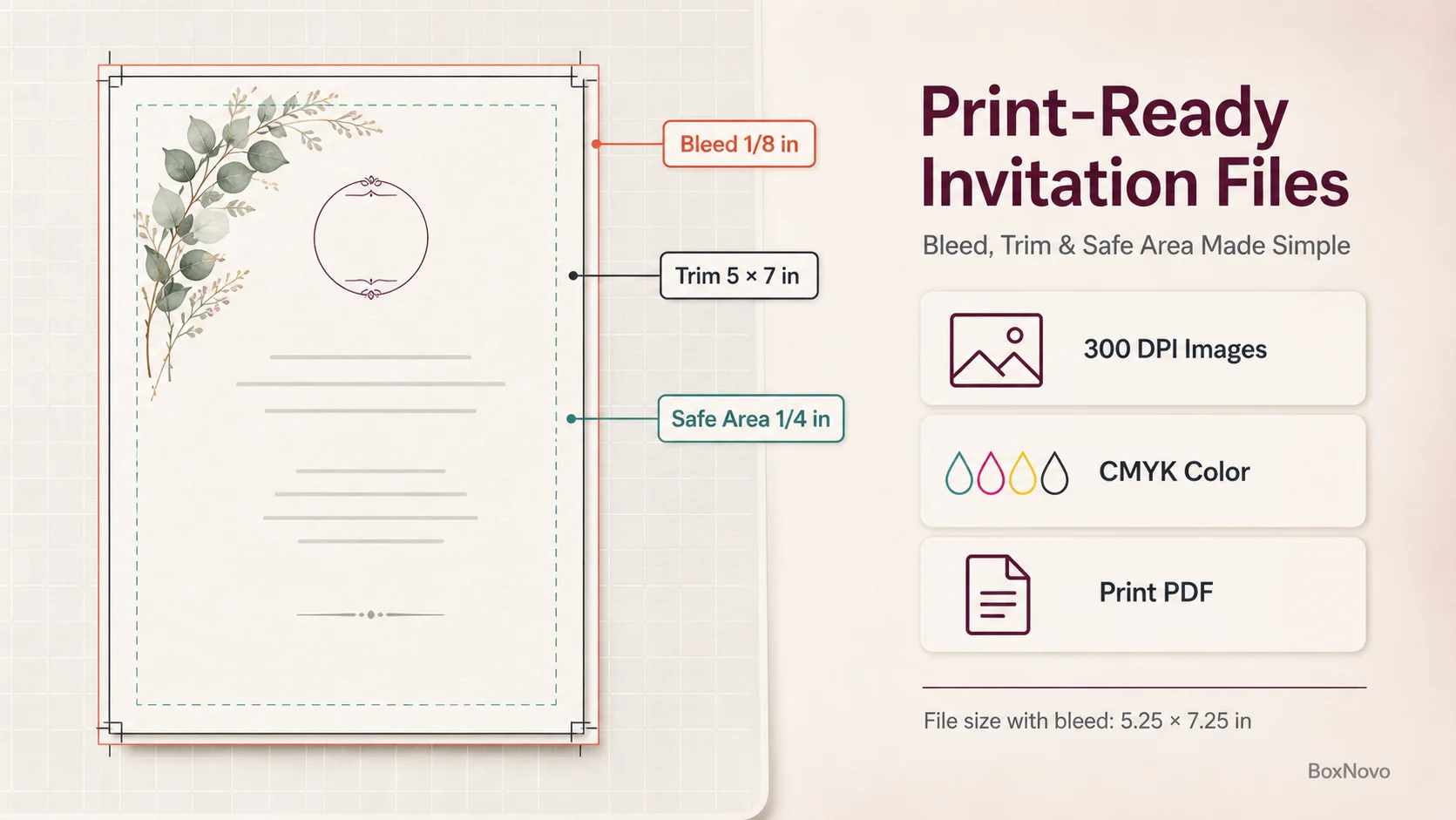
A print-ready invitation file needs 1/8 in bleed, a 1/4 in safe area, 300 DPI images, CMYK color and a print PDF.
Invitation Files: How to Prepare a Print-Ready File
A print-ready file is the single biggest factor in how your invitations turn out. Printers cut cards from larger sheets, so the file needs extra room at the edges and a safe zone for text.
Size, Bleed and Safe Area
Trim size is the finished card size, for example 5 × 7 in.
Bleed is extra background that extends past the trim, usually 1/8 in on every side. A 5 × 7 in invitation becomes a 5.25 × 7.25 in file.
Safe area keeps text and important details at least 1/4 in inside the trim, so nothing gets cut off if the trim shifts slightly (StationeryHQ).
If you’re unsure, our guide shows how to add bleed correctly for any print size.
Resolution and Pixel Sizes
Photos and artwork should be 300 dpi at the printed size. That means a 5 × 7 in invitation with bleed needs an image of at least 1575 × 2175 pixels.
Invitation size
File size with 1/8 in bleed
Pixels at 300 dpi
3.5 × 5 in (RSVP)
3.75 × 5.25 in
1125 × 1575
4.25 × 5.5 in
4.5 × 5.75 in
1350 × 1725
4 × 6 in
4.25 × 6.25 in
1275 × 1875
5 × 7 in
5.25 × 7.25 in
1575 × 2175
5.5 × 8.5 in
5.75 × 8.75 in
1725 × 2625
5.25 × 5.25 in (square)
5.5 × 5.5 in
1650 × 1650
Color, Fonts and File Format
Use CMYK for professional printing, because printing presses use CMYK inks. Screen colors (RGB) can shift when printed, so convert RGB to CMYK and check important colors on a proof.
Keep text as vector text or outlined fonts so it prints sharp. Avoid flattening text into a low-resolution image.
Export a high-quality print PDF. Many printers recommend a PDF/X preset; JPG and PNG files can soften fine text.
Two-sided invitations need two pages in the PDF, front first, both in the same orientation.
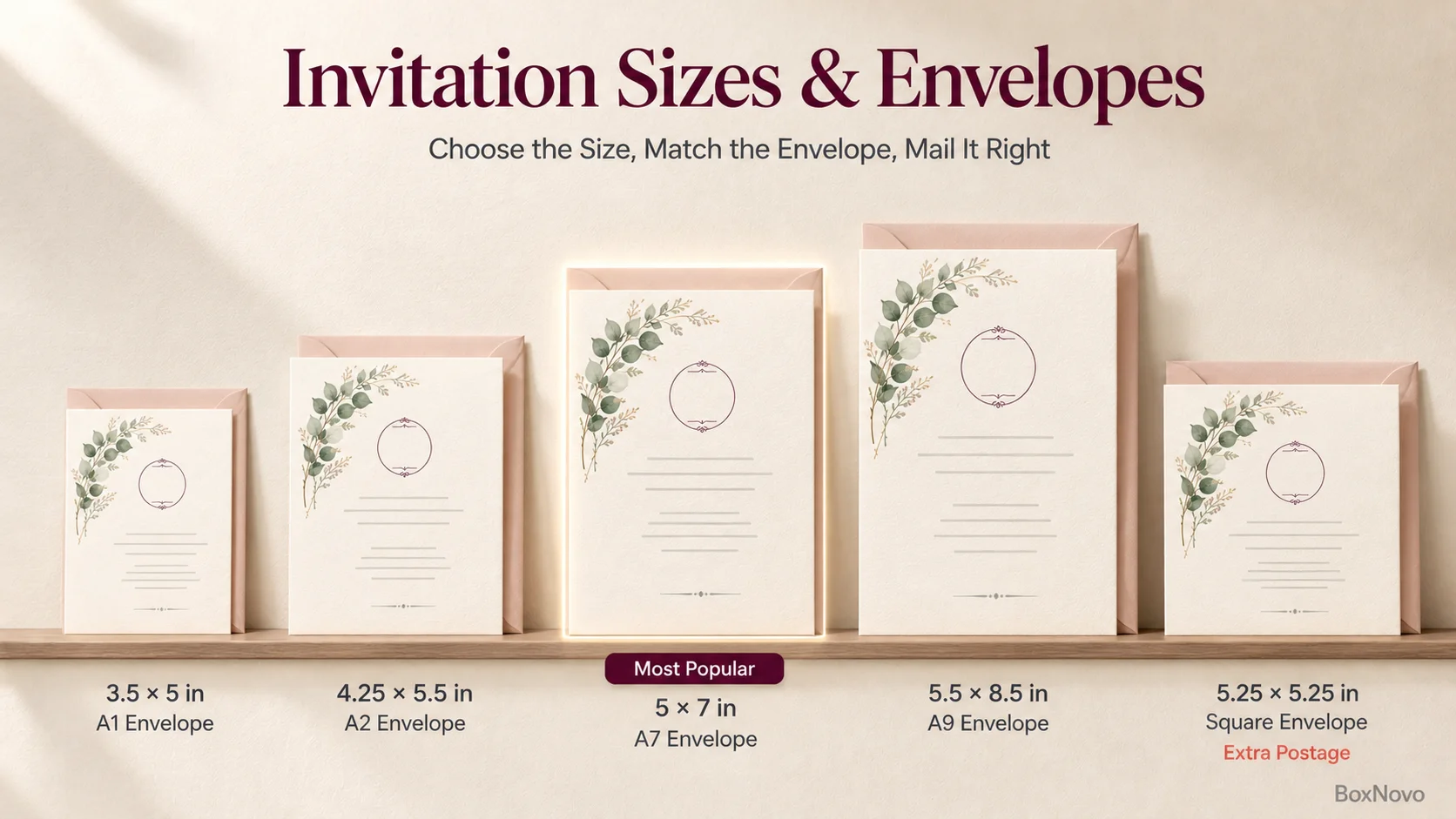
Match your invitation size to the right envelope before you print. Square invitations need extra postage.
Invitation Sizes, Envelopes and Postage
The invitation size decides the envelope and can change your postage. Most invitations fit a standard “A-style” envelope that’s slightly larger than the card.
Invitation size
Common use
Matching envelope
3.5 × 5 in
RSVP cards, small inserts
A1 (3 5/8 × 5 1/8 in)
4.25 × 5.5 in
Party invitations, thank-you cards
A2 (4 3/8 × 5 3/4 in)
4 × 6 in
Photo invitations, compact invitations
A6 (4 3/4 × 6 1/2 in)
5 × 7 in
The most popular invitation size
A7 (5 1/4 × 7 1/4 in)
5.5 × 8.5 in
Large invitations and menus
A9 (5 3/4 × 8 3/4 in)
4 × 9 in
Slim invitations, programs, itineraries
#10 (4 1/8 × 9 1/2 in)
5.25 × 5.25 in
Square, modern invitations
Square envelope, about 5.5 × 5.5 in
A-style envelope sizes from 4OVER4. Save-the-dates are often sent as postcards instead; compare common postcard formats if you’re choosing between a card and a postcard.
Postage Rules That Affect Invitations
USPS treats a letter as nonmachinable, which means extra postage per envelope, if it’s square or has a length-to-height ratio below 1.3 or above 2.5. The same applies if it’s too rigid to bend, has clasps, strings or buttons, or has bumps that make its thickness uneven (USPS Domestic Mail Manual). For invitations, that means:
Square envelopes always cost more to mail.
Wax seals, ribbons, thick board and 3D embellishments can make an envelope nonmachinable.
Letters must be at most 6 1/8 × 11 1/2 in and 1/4 in thick, and weigh no more than 3.5 oz.
A standard stamp covers 1 oz. A thick card with an RSVP card, envelope and details card can go over, so weigh one fully assembled invitation at the post office before buying stamps.
Choosing Paper and Printing Methods
Invitation Paper Weights
Paper weight is shown in pounds (lb), grams per square meter (gsm) or points (pt). The lb and gsm figures don’t convert on a straight ratio, so treat these as approximate:
Paper
Approximate weight
Typical use
Light cover stock
80 lb cover / about 216 gsm
Upper limit for many home printers
Medium card
100 lb cover / about 270 gsm
RSVP and enclosure cards
Standard invitation card
110 lb cover / about 300 gsm
Most professionally printed invitations
Heavy card
120 to 140 lb cover / about 350 to 380 gsm
Premium invitations, foil
Double thick
220 lb and up / about 600 gsm
Letterpress and luxury suites
Weights from Paperlust. Finish matters too: matte and uncoated papers feel classic and are easy to write on, linen adds texture, and pearl or shimmer adds a subtle glow.
Printing Methods Compared
Method
Look and feel
Best for
Digital printing
Flat, full color, sharp
Most invitations, photos, short runs
Offset printing
Flat, very consistent color
Large quantities
Letterpress
Design pressed into thick paper
Luxury and wedding invitations
Foil stamping
Shiny metallic or colored foil
Names, monograms and accents
Thermography
Raised, glossy ink
A raised effect at lower cost than engraving
Engraving
Raised print with a slight dent on the back
Formal, traditional invitations
How to Print Invitations at Home
If you’re printing a small batch yourself, these steps give the most professional result:
Check your printer’s maximum paper weight in its specifications and buy cardstock within that limit.
Set up two invitations per sheet on 8.5 × 11 in cardstock with bleed and crop marks, or one per sheet for larger cards.
Print a test on plain paper and hold it against your cardstock to check alignment and size.
Choose the right settings: paper type set to cardstock or heavy matte, the highest print quality, and scaling at 100% or “actual size.”
Feed cardstock through the rear or manual tray if your printer has one, a few sheets at a time.
Let the ink dry fully before stacking, especially on coated paper.
Trim with a paper trimmer or a craft knife and ruler, cutting along the crop marks.
If you’re printing multi-page programs or inserts, use the right collate print settings so each set comes out in order.
Plan Your Order: Timeline and Quantity
When to Send Invitations
Event
When to mail invitations
Wedding
6 to 8 weeks before; 8 weeks if guests RSVP by mail (The Knot)
Bridal or baby shower
4 to 6 weeks before
Birthday party
2 to 4 weeks before; 4 to 5 weeks for bigger parties
Graduation party
4 to 8 weeks before
Holiday party
4 to 8 weeks before
Shower, birthday, graduation and holiday timings from Paperless Post. For weddings, The Knot suggests ordering pre-designed online invitations about 12 to 14 weeks before the wedding so they’re in hand at least 10 weeks ahead.
How Many Invitations to Order
Count households, not guests. A couple or a family usually shares one invitation.
Add 10 to 15% extra for mistakes, late additions and keepsakes.
Order enough envelopes for addressing mistakes too.
Matching Stationery and Event Extras
Invitations are often part of a bigger set of printed pieces. Planning them together keeps colors, fonts and paper consistent.
RSVP and details cards: order them with the invitation so the paper and colors match.
Wedding and event programs:printed wedding programs in a stapled booklet hold the order of service, readings and thank-yous.
Table numbers and signs:table number tents stand on their own and match the invitation design.
Envelope seals:round envelope seals are a flat, mail-friendly alternative to wax seals.
Favors:wedding favor boxes printed with the same design carry the theme to the tables.
Boxed invitations: for proposals to bridesmaids or VIP guests, luxury invitation boxes make the invitation a gift.
Invitation Printing Mistakes to Avoid
Designing without bleed, then getting white slivers at the edges after trimming.
Placing text too close to the edge, where it gets cut off.
Using low-resolution images copied from a website or phone screenshot.
Skipping the proof and missing a typo in a name, date or address.
Choosing a square or bulky design without budgeting for extra postage.
Ordering exactly one invitation per household with no spares.
Leaving too little time for shipping, addressing and mailing.
Buying cardstock that’s too heavy for a home printer.
Invitation Printing Checklist
Decide where to print based on your timeline, quantity and budget.
Set the size and confirm the matching envelope.
Build the file with 1/8 in bleed, a 1/4 in safe area and 300 dpi images.
Export a print-ready PDF in CMYK with vector text.
Check the proof for every name, date, time and address.
Order a sample for weddings and large orders.
Order 10 to 15% extra and spare envelopes.
Weigh one assembled invitation and buy the right postage.
Mail on time using the timing for your event.
Frequently Asked Questions About Printing Invitations
Where can I print invitations the same day?
Office and copy stores and photo centers offer same-day printing on select products. FedEx Office quick invitations are often ready the same day or within 24 hours, Staples offers same-day pickup on select cards ordered by 12 pm, and Walmart Photo offers same-day pickup on many invitation styles at participating stores.
Where is the best place to print invitations?
For most people, an online invitation printer is the best balance of quality, choice and price. Use a copy store when you need them fast, a local stationer for letterpress or foil, and your home printer for small, simple batches.
Can I upload and print my own invitation design?
Yes. Most online printers, office stores and photo centers have an “upload your own design” option. Export a high-resolution PDF at the exact size with 1/8 in bleed for the best result.
Where can I print invitations I bought as a digital template?
Download the print file from the seller, usually a PDF or JPG, and print it at a copy store or upload it to an online printer. Check that the file includes bleed and that the seller’s license allows printing.
What paper should invitations be printed on?
Most professionally printed invitations use cardstock around 110 lb cover (about 300 gsm). Use heavier or double-thick stock for letterpress and premium designs, and stay within your printer’s limit if you print at home.
What file format is best for printing invitations?
A high-quality print PDF is best. It keeps text sharp, holds the exact size and bleed, and is the format most printers prefer.
Do square invitations cost more to mail?
Yes. USPS treats square letters as nonmachinable, so each square envelope needs extra postage on top of the standard stamp.
How many invitations should I order?
Count households rather than individual guests, then add 10 to 15% extra for mistakes, late additions and keepsakes.
How far in advance should I order wedding invitations?
The Knot suggests ordering pre-designed online wedding invitations 12 to 14 weeks before the wedding, so they arrive in time to address and mail them 6 to 8 weeks before the date. Allow more time for letterpress, foil or custom designs.
Print Invitations With Confidence
Knowing where to print invitations comes down to timing, quantity and the look you want. Online printers suit most invitations, copy stores handle last-minute orders, local stationers deliver premium finishes, and home printing works for small batches. Whichever you choose, a print-ready file, a careful proof and the right envelope make the difference.
If you’re planning event printing beyond the invitation, BoxNovo can print matching programs, labels, table tents and gift packaging. Explore our custom printing services or request a print quote.
BoxNovo Packaging Experts share practical insights on custom packaging, box styles, printing, labels, dimensions, materials, and product presentation. Our content helps businesses understand packaging options, choose the right solutions for their products, and create packaging that looks professional while supporting a stronger brand experience.