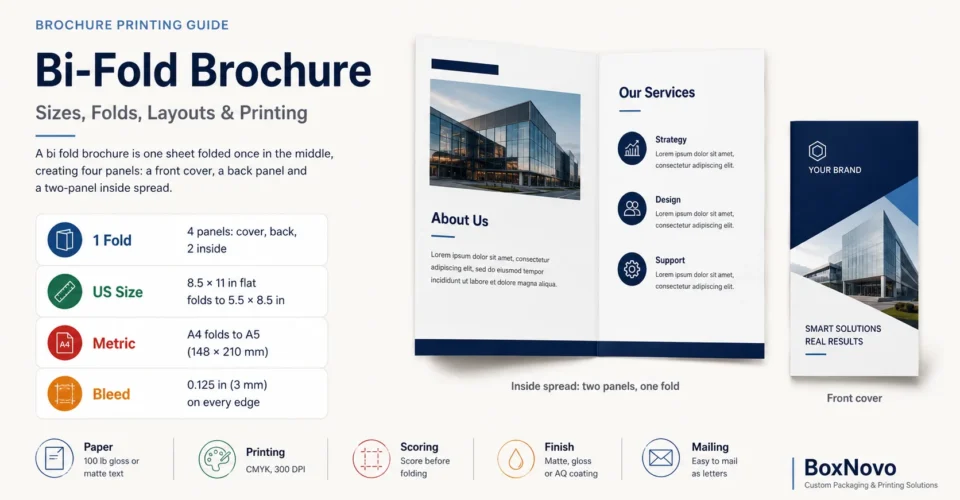
Quick answer: A bi fold brochure is one sheet folded once in the middle, giving four panels: a front cover, a back panel and a two-panel inside spread. The most common size is 8.5 × 11 in folded to 5.5 × 8.5 in. Outside the US it is A4 folded to A5 (148 × 210 mm). Add 0.125 in (3 mm) bleed on every edge.
Key facts at a glance
- Also called: half fold brochure or single-fold brochure
- Panels: 4 (front cover, back panel, inside left, inside right)
- Most common US size: 8.5 × 11 in flat, 5.5 × 8.5 in folded
- Larger US size: 11 × 17 in flat, 8.5 × 11 in folded
- Metric: A4 folds to A5 (148 × 210 mm); A3 folds to A4 (210 × 297 mm)
- File setup: 0.125 in (3 mm) bleed, CMYK, 300 DPI, text kept away from the fold
- Paper: 100 lb gloss or matte text is a common choice; heavy cover stock should be scored before folding
In this guide
- What a bi-fold brochure is
- Bi-fold brochure measurements
- Brochure fold types compared
- Bi-fold brochure layout and panel order
- How to set up the print file
- Paper, coatings and scoring
- Mailing a bi-fold brochure
- Bi-fold brochures in product packaging
- Common mistakes
- Print checklist
- Frequently asked questions
- Sources
What Is a Bi Fold Brochure?
A bi fold brochure is a single sheet of paper folded once down the center, like a book. That one fold creates two leaves and four printable panels: the front cover and back panel on the outside, and a two-panel spread on the inside. The same format is called a half fold brochure because the fold sits exactly halfway across the sheet.
Bi-folds suit content that needs more room than a flyer but less than a booklet: menus, price lists, event programs, product overviews, service guides and inserts for product boxes. The large inside spread can be used as one wide layout, which a tri-fold cannot offer.
| Feature | Bi-Fold (Half Fold) |
|---|---|
| Folds | 1, in the center |
| Panels | 4 (2 outside, 2 inside) |
| Printed sides | 2 (outside spread and inside spread) |
| Opens like | A book or greeting card |
| Best for | Menus, programs, product sheets, price lists, box inserts |
Bi Fold Brochure Measurements and Sizes
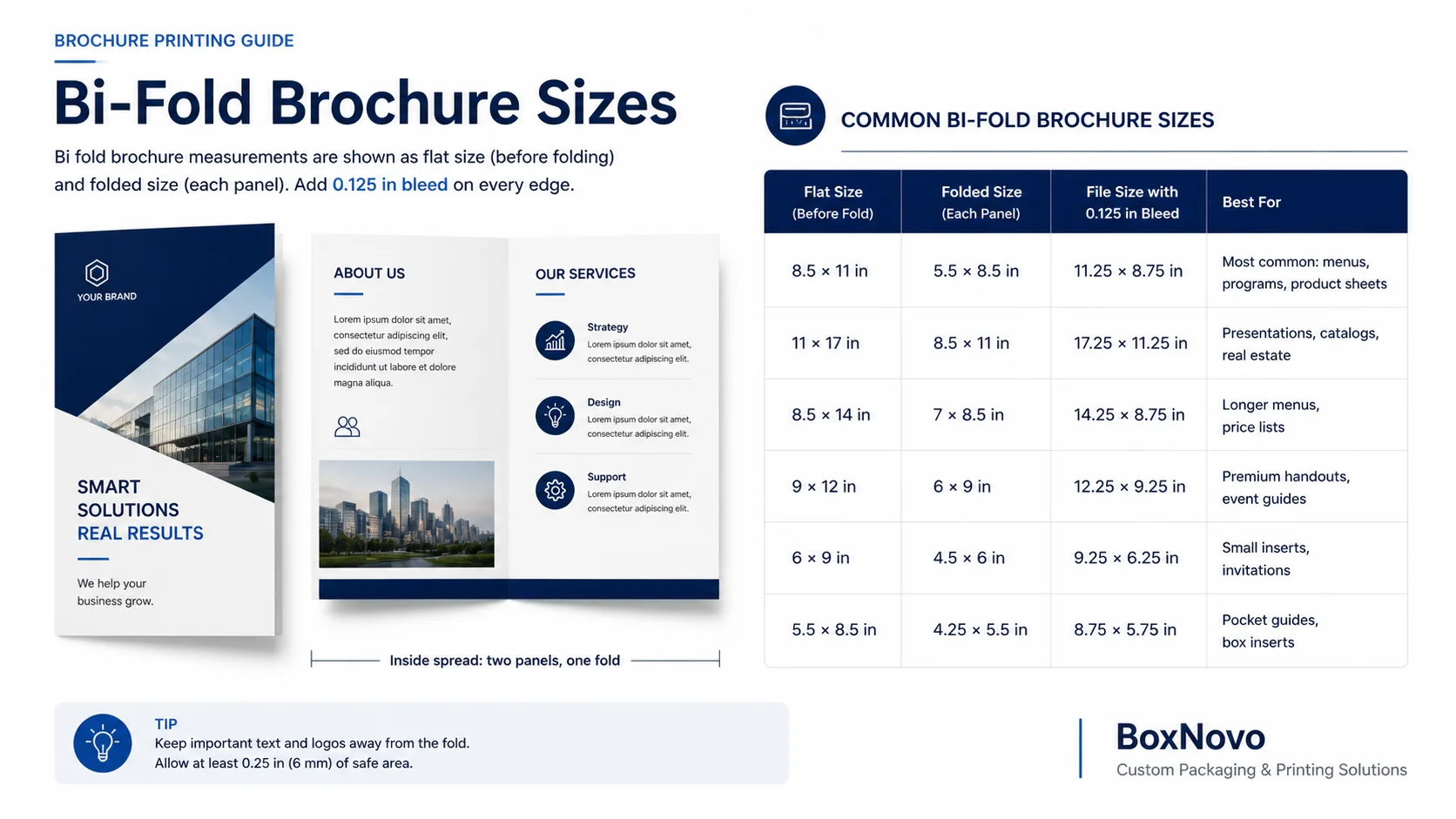
Bi fold brochure measurements are given two ways: the flat size (the sheet before folding) and the folded size (half the flat size). The print file is the flat size plus bleed. Folded sizes below are half of the flat width; each panel is the same size as the folded brochure.

US Bi-Fold Brochure Sizes
| Flat Size | Folded Size (Each Panel) | File Size With 0.125 in Bleed | Common Use |
|---|---|---|---|
| 8.5 × 11 in (Letter) | 5.5 × 8.5 in | 11.25 × 8.75 in | Most common: menus, programs, product sheets |
| 11 × 17 in (Tabloid) | 8.5 × 11 in | 17.25 × 11.25 in | Presentation folders, catalogs, real estate |
| 8.5 × 14 in (Legal) | 7 × 8.5 in | 14.25 × 8.75 in | Longer menus and price lists |
| 9 × 12 in | 6 × 9 in | 12.25 × 9.25 in | Premium handouts, event guides |
| 6 × 9 in | 4.5 × 6 in | 9.25 × 6.25 in | Small inserts, invitations |
| 5.5 × 8.5 in (Half Letter) | 4.25 × 5.5 in | 8.75 × 5.75 in | Pocket guides, box inserts |
Printers such as 4OVER4 list letter, tabloid, 9 × 12, 6 × 9 and half letter as standard bi-fold sizes. File sizes are calculated by adding 0.125 in bleed to each edge.
Bi Fold Brochure Measurements in mm (A Sizes)
| Flat Size | Folded Size | File Size With 3 mm Bleed |
|---|---|---|
| A4 (210 × 297 mm) | A5 (148 × 210 mm) | 303 × 216 mm |
| A3 (297 × 420 mm) | A4 (210 × 297 mm) | 426 × 303 mm |
| A5 (148 × 210 mm) | A6 (105 × 148 mm) | 216 × 154 mm |
| 198 × 210 mm | DL (99 × 210 mm) | 204 × 216 mm |
Each A size is half the one above it, so an A4 sheet folded in half gives two A5 panels. A sizes and their bleed sizes are listed in this paper sizes guide. For more on A sizes and US equivalents, see this booklet size chart.
Portrait or Landscape?
- Side fold (portrait): the fold is on the left edge, so the folded brochure is taller than it is wide. An 8.5 × 11 in sheet folds to 5.5 in wide × 8.5 in tall. This is the standard book-style bi-fold.
- Top fold (landscape): the fold is on the top edge, so the brochure opens upward like a calendar. The same sheet folds to 8.5 in wide × 5.5 in tall. Use it for wide photos, tables or timelines.
Brochure Fold Types Compared
The brochure fold you choose sets the number of panels, the reading order and the folded size. Here is how the bi-fold compares with the other common folds on a US letter sheet:
| Brochure Fold | Folds | Panels (Both Sides) | Letter Sheet Folds To | Best For |
|---|---|---|---|---|
| Bi-fold (half fold) | 1 | 4 | 5.5 × 8.5 in | Menus, programs, product sheets |
| Tri-fold (letter fold) | 2 | 6 | About 3.67 × 8.5 in | Rack brochures, step-by-step info |
| Z-fold | 2 | 6 | About 3.67 × 8.5 in | Maps, timelines, sequential content |
| Gate fold | 2 | 6 | 5.5 × 8.5 in (flaps meet in the center) | Launches, reveals, premium pieces |
| French fold | 2 (at right angles) | 4 (printed on one side) | 4.25 × 5.5 in | Invitations, posters folded small |
Letter fold sizes follow 4OVER4; gate fold and French fold panel layouts follow Smartpress.
Bi-Fold vs Three Fold Brochure
A three fold brochure (tri-fold) has two folds and six panels, folds to about one-third of the sheet width, and fits standard brochure racks and #10 envelopes. Its inside panel must be slightly narrower so it tucks in cleanly: on a letter sheet, Smartpress uses 3.6875 in for the outer panels and 3.625 in for the inside panel. A bi-fold has equal panels, a larger cover and a wide inside spread, so it reads more like a mini catalog. Choose a tri-fold for racks and step-by-step content; choose a bi-fold when you need bigger images or a single wide layout. For packaging uses of the three-panel format, see these tri-fold brochure inserts.
Bi-Fold vs Gate Fold Brochure
A gate fold brochure has two outer flaps that fold in from each side and meet in the middle, like doors. The center panel is half the sheet width and each flap is half of the center panel; on an 11 in wide sheet that is a 5.5 in center panel and two 2.75 in flaps. For a closed gate fold, which adds a center fold, Smartpress makes each flap 1/16 in shorter. A gate fold brochure costs more to fold but gives a dramatic reveal; a bi-fold is simpler, cheaper and easier to read.
Bi Fold Brochure Layout: Panel Order and Content
A good brochure layout starts with panel order. A bi-fold prints as two spreads: the outside spread and the inside spread. The most common mistake is putting the front cover on the left of the outside spread, which makes it print on the back.
| Panel | Position in the File | What to Put There |
|---|---|---|
| Front cover | Outside spread, right half | Brand name, headline, one strong image, what the brochure is about |
| Back panel | Outside spread, left half | Contact details, address, map, QR code, social links, call to action |
| Inside left | Inside spread, left half | Introduction, about us, the problem you solve |
| Inside right | Inside spread, right half | Products, services, prices, benefits, offer |
Brochure Layout Tips
- One message per panel: give each panel one job so readers can scan it.
- Use the spread: the inside can run as one wide layout, such as a large photo, a menu or a comparison table across both panels.
- Respect the fold: keep text, faces and logos at least 0.1875 in (about 5 mm) away from the fold line; 4OVER4 calls this the fold gutter.
- Avoid heavy ink on the fold: dark solid color across the fold can crack when folded, so plan a lighter area or score the sheet.
- Clear hierarchy: headline, subheads, short paragraphs and bullet points read better than long text blocks.
- Strong back panel: many people flip a brochure over first, so put the call to action and contact details there.
- Brand consistency: use your brand colors and convert them accurately with a CMYK color converter.
How to Set Up a Bi-Fold Brochure Print File
- Set the page size to the flat trim size, for example 11 × 8.5 in landscape for a letter bi-fold.
- Add bleed of 0.125 in (3 mm) on every outside edge, making the document 11.25 × 8.75 in. Bleed goes on the outside edges only, not at the fold.
- Add a fold guide at the center: 5.5 in from the trim edge on a letter bi-fold.
- Set a safe zone of at least 0.125 in inside the trim edge (5 mm in metric), and keep text 0.1875 in from the fold.
- Build two pages: page 1 is the outside spread (back panel left, front cover right), page 2 is the inside spread.
- Use CMYK and 300 DPI images at final print size. At 300 DPI a letter bi-fold file with bleed is 3,375 × 2,625 pixels.
- Export a print-ready PDF with fonts embedded and crop marks if your printer asks for them.
These settings match printer guidance from 4OVER4 and Thomas Printworks. Check margins visually with this bleed and safe zones guide. Designing in Canva? Follow these steps for print-ready Canva files.
Paper, Coatings and Scoring
| Stock | Feel | Best For |
|---|---|---|
| 70 lb uncoated text | Thin, writable, economical | Forms, programs, high quantities |
| 80 lb gloss text | Like a magazine page | Handouts and direct mail |
| 100 lb gloss or matte text | Thicker, premium magazine feel | Most bi-fold brochures |
| 10 pt to 14 pt cover | Stiff, card-like | Menus, premium brochures, box inserts |
NextDayFlyers and 4OVER4 offer 70 lb uncoated, 80 lb and 100 lb text and 10 pt or 14 pt cover stocks for folded brochures. Gloss makes photos pop; matte and silk reduce glare and are easier to write on.
- Fold with the grain where possible: folds made with the grain are smoother and crack less (CreativePro).
- Score heavy stock: score any fold that runs against the grain, and score cover stock even with the grain. 4OVER4 recommends scoring for 16 pt and heavier.
- Let the printer fold: machine folding keeps the fold straight and the panels even across the whole run.
Mailing a Bi-Fold Brochure
A bi-fold can mail without an envelope as a USPS folded self-mailer, as long as it meets letter-size rules. A 5.5 × 8.5 in folded brochure fits these limits; an 8.5 × 11 in folded brochure is larger than letter size and mails as a flat.
| USPS Folded Self-Mailer Rule | Requirement |
|---|---|
| Size | 3.5 to 6 in high, 5 to 10.5 in long |
| Paper | At least 70 lb book grade |
| Final fold | On the bottom edge (horizontal pieces) or the leading right edge (vertical pieces) |
| Sealing | Tabs or glue to keep the open edges closed |
| Weight | Up to 3 oz |
These rules come from the USPS guide to folded self-mailers, booklets and flats. Leave one outside panel clear for the address and postage, and check the current rules with USPS or your mail house before printing a large run.
Bi-Fold Brochures in Product Packaging
A folded brochure is one of the easiest ways to add product information, care instructions, a brand story or a reorder offer to a box. Bi-folds work well as inserts because they lie flat and open like a card.
- Size to the box: make the folded brochure slightly smaller than the inside length and width of the box so it slides in without bending. This guide to sizing a custom box explains inside dimensions.
- Common insert sizes: 5.5 × 8.5 in folded suits most shipping and mailer boxes; 4.25 × 5.5 in folded suits smaller product boxes.
- Match the unboxing: place the brochure on top of the product or inside the lid so it is the first thing customers see, as in these custom mailer boxes.
- Use heavier stock: 100 lb text or cover stock looks better and survives handling in the box.
- Design with the box: use the same colors and fonts as your branded product boxes so the insert feels part of the packaging.
Need more pages than four panels? A stapled booklet is the next step up; see this custom booklet printing option. For multi-page product catalogs, this catalog printing guide covers binding and paper.
Common Bi-Fold Brochure Mistakes
| Mistake | Fix |
|---|---|
| Front cover on the left of the outside spread | Put the front cover on the right half and the back panel on the left |
| Designing at folded size instead of flat size | Set the document to the flat trim size, such as 11 × 8.5 in |
| No bleed | Add 0.125 in (3 mm) on every outside edge |
| Text or faces across the fold | Keep text at least 0.1875 in from the fold line |
| Heavy ink cracking on the fold | Lighten the fold area, fold with the grain or score the sheet |
| RGB images or low resolution | Convert to CMYK and use 300 DPI images |
| Confusing A4 with US Letter | A4 is 210 × 297 mm (8.27 × 11.69 in); Letter is 8.5 × 11 in |
| Mailing a piece that misses USPS rules | Check size, paper weight, fold position and tabs before printing |
Bi-Fold Brochure Print Checklist
- Flat and folded size chosen, and orientation set (side fold or top fold).
- Document set to the flat trim size with 0.125 in (3 mm) bleed.
- Fold guide placed at the center.
- Outside spread: back panel left, front cover right.
- Inside spread laid out as two panels or one wide design.
- Text inside the safe zone and away from the fold.
- Images CMYK at 300 DPI; fonts embedded.
- Paper, coating and scoring chosen.
- USPS self-mailer rules checked if mailing without an envelope.
- Printed proof folded and checked before the full run.
Frequently Asked Questions
What is a bi fold brochure?
A single sheet folded once in the center to make four panels: a front cover, a back panel and a two-panel inside spread.
What is the standard bi-fold brochure size?
8.5 × 11 in flat, folded to 5.5 × 8.5 in. The larger standard is 11 × 17 in flat, folded to 8.5 × 11 in.
What are bi fold brochure measurements in mm?
A4 (210 × 297 mm) folded to A5 (148 × 210 mm) is the most common. A3 folds to A4, and A5 folds to A6 (105 × 148 mm).
Is a half fold brochure the same as a bi-fold?
Yes. Half fold, bi-fold and single fold all describe one sheet folded once in the center.
How many panels does a bi-fold brochure have?
Four: two on the outside (front cover and back panel) and two on the inside.
What size should a bi-fold brochure file be?
The flat size plus bleed. A letter bi-fold file is 11.25 × 8.75 in with 0.125 in bleed; an A4 bi-fold file is 303 × 216 mm with 3 mm bleed.
Which side is the front cover of a bi-fold brochure?
On the outside spread, the front cover is the right half and the back panel is the left half.
What is the difference between a bi-fold and a three fold brochure?
A bi-fold has one fold and four equal panels. A three fold brochure has two folds and six panels, with a slightly narrower inside panel.
What is a gate fold brochure?
A brochure with two side flaps that fold in and meet in the center, each half the width of the center panel.
What paper is best for a bi-fold brochure?
100 lb gloss or matte text suits most bi-folds. Use 10 to 14 pt cover stock for menus, premium pieces and box inserts.
Does a bi-fold brochure need scoring?
Score heavy cover stock and any fold against the grain. Light text weights folded with the grain usually fold cleanly without scoring.
Can a bi-fold brochure be mailed without an envelope?
Yes, as a USPS folded self-mailer if it meets letter-size rules: up to 6 × 10.5 in, at least 70 lb paper, the correct final fold and tabs or glue.
How far should text be from the fold?
At least 0.1875 in (about 5 mm) from the fold line and 0.125 in from the trim edge.
What is the best brochure layout for a bi-fold?
Headline and image on the front cover, introduction on the inside left, products or services on the inside right, and contact details on the back.
Can a bi-fold brochure be used as a packaging insert?
Yes. A 5.5 × 8.5 in or 4.25 × 5.5 in folded brochure fits many shipping and product boxes and lies flat on top of the product.
Which brochure fold is cheapest?
The bi-fold, because it has only one fold. Tri-folds and gate folds need two folds and more careful panel sizing.
Final Takeaway
A bi fold brochure is the simplest folded format: one fold, four panels and a wide inside spread. Choose the size first (8.5 × 11 in to 5.5 × 8.5 in in the US, A4 to A5 elsewhere), set up the file at the flat size with bleed, put the front cover on the right of the outside spread, keep text away from the fold and choose a stock that folds cleanly. Done well, it works as a handout, a mailer or a branded insert inside your packaging.
Planning brochures or inserts to ship with your products? BoxNovo can print them to match your boxes. Request a printing quote to get started.
Sources
- 4OVER4: bifold brochure setup and panel dimensions
- 4OVER4: common brochure sizes and fold options
- Smartpress: brochure folding ideas and panel sizes
- Thomas Printworks: 8.5 × 11 bi-fold brochure template
- NextDayFlyers: bi-fold brochure paper stocks
- Where The Trade Buys: paper sizes guide
- Sheffield Hallam University Print Shop: A5 leaflet folded from A4
- CreativePro: paper grain and folding
- USPS PostalPro: folded self-mailers, booklets and flats