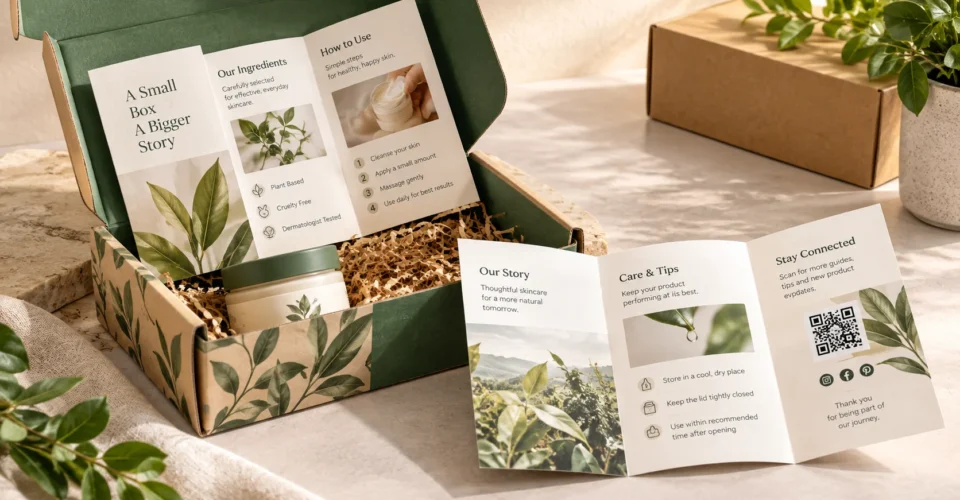
A trifold brochure is a single sheet folded twice to create six panels. For packaging, however, the real question is not simply how to make a brochure look good. It is whether the folded piece fits the package, carries the right amount of information, opens in a logical sequence, survives handling, and supports the product experience.
That makes a packaging trifold different from a generic marketing handout. You need to think about the box, the product, the available insert space, the customer’s unboxing sequence, the amount of content, the fold style, and the print specifications at the same time.
This guide covers the complete decision: what a tri fold brochure is, how its six panels work, common brochure sizes, how to choose a size for a product box, letter folds versus Z-folds, print-ready setup, paper and finish, packaging insert applications, ecommerce use, sustainability, and the mistakes that cause otherwise good designs to fail.
If the brochure will sit inside a custom package, start with the package dimensions rather than designing the brochure first. For a broader overview of how packaging components work together, see the BoxNovo guide to broader custom-packaging system guide.
What Is a Trifold Brochure?
A trifold brochure is a sheet of paper folded twice to create six panels—three on each side. The most familiar version is the letter fold, where the outer panels fold inward. A Z-fold also uses two folds, but the panels alternate direction like an accordion.
The important distinction for packaging is that the six panels are not automatically six equal design areas. Fold direction, paper thickness, finishing, and the way one panel tucks into another can require panel-width adjustments. A production template from the printer should take precedence over a generic three-column layout.
Trifold Brochure Definition and Basic Structure
In plain language, the definition of a brochure is a compact printed or digital communication piece used to organize information about a product, service, organization, event, or offer. A trifold adds a physical folding structure that controls how that information is revealed.
That structure is why a trifold works well when the reader needs a short sequence rather than one uninterrupted page. The cover introduces the subject, the opening panels create context, the interior spread carries the main information, and the back panel can finish with contact information, a QR code, instructions, or a call to action.
How Many Panels Does a Trifold Have?
A standard single-sheet trifold has six panels: three on the outside and three on the inside. The six panels are created by two folds, not by cutting the sheet into separate pages.
- Outside side: front cover, back panel, and the panel that acts as the opening flap.
- Inside side: the three-panel spread that becomes visible when the brochure is fully opened.
- Letter fold: the outer panels fold inward.
- Z-fold: the panels alternate direction and form an accordion-like sequence.
Trifold Brochure vs. Flyer, Postcard, Booklet and Catalog
The best format depends on how much information you have and how you want the reader to interact with it.
| Format | Best use | Information capacity | Packaging role |
|---|---|---|---|
| Trifold brochure | Guided product or service story | Medium | Flexible insert when six panels are useful |
| Flat insert card | One message, thank-you, QR, care note | Low | Excellent for compact boxes |
| Postcard | Single offer or quick message | Low | Useful when no folding is needed |
| Booklet | Detailed instructions, education, catalog content | High | Better when a trifold would be crowded |
| Product catalog | Multiple products/SKUs | High | Useful for larger product programs |
| Zine / magazine-style piece | Editorial or story-driven content | Medium–high | Usually better for substantial brand storytelling |
Why Use a Trifold Brochure as a Packaging Insert?
A packaging insert has a different job from an ordinary sales brochure. It arrives after the purchase, when the customer already owns the product. That changes what the reader needs: clear instructions, product education, reassurance, care information, cross-sell guidance, brand story, or an easy path to the next action.
- Product education: explain what the product does, how to use it, or what to expect.
- Instructions: provide several steps without forcing everything onto a tiny card.
- Brand story: use the interior spread for a concise origin story, formulation story, sourcing explanation, or mission.
- QR access: connect the printed piece to a digital guide, reorder page, tutorial, registration page, or support resource.
- Post-purchase communication: include care guidance, reorder information, or a useful next step.
- Cross-selling: introduce complementary products without turning the insert into a dense catalog.
The insert should earn its space. If the customer needs only one sentence, a QR code, or a thank-you message, a smaller flat insert may be more appropriate. If the information is extensive, a booklet or dedicated instruction sheet may be better.
A Packaging Insert Should Be Planned Around the Unboxing Sequence
Think about where the customer encounters the insert. An insert placed directly under the lid can act as the first message. One placed above the product can introduce the brand before the product is removed. An insert underneath the product can focus on usage, care, or reordering after the main reveal.
- First layer: attention and orientation.
- Second layer: product education or instructions.
- Final layer: useful next action such as a QR code, care instruction, reorder path, or related product.
How the Six Panels of a Packaging Trifold Should Work
Do not begin by filling six blank rectangles with text. Give every panel a job before writing copy.
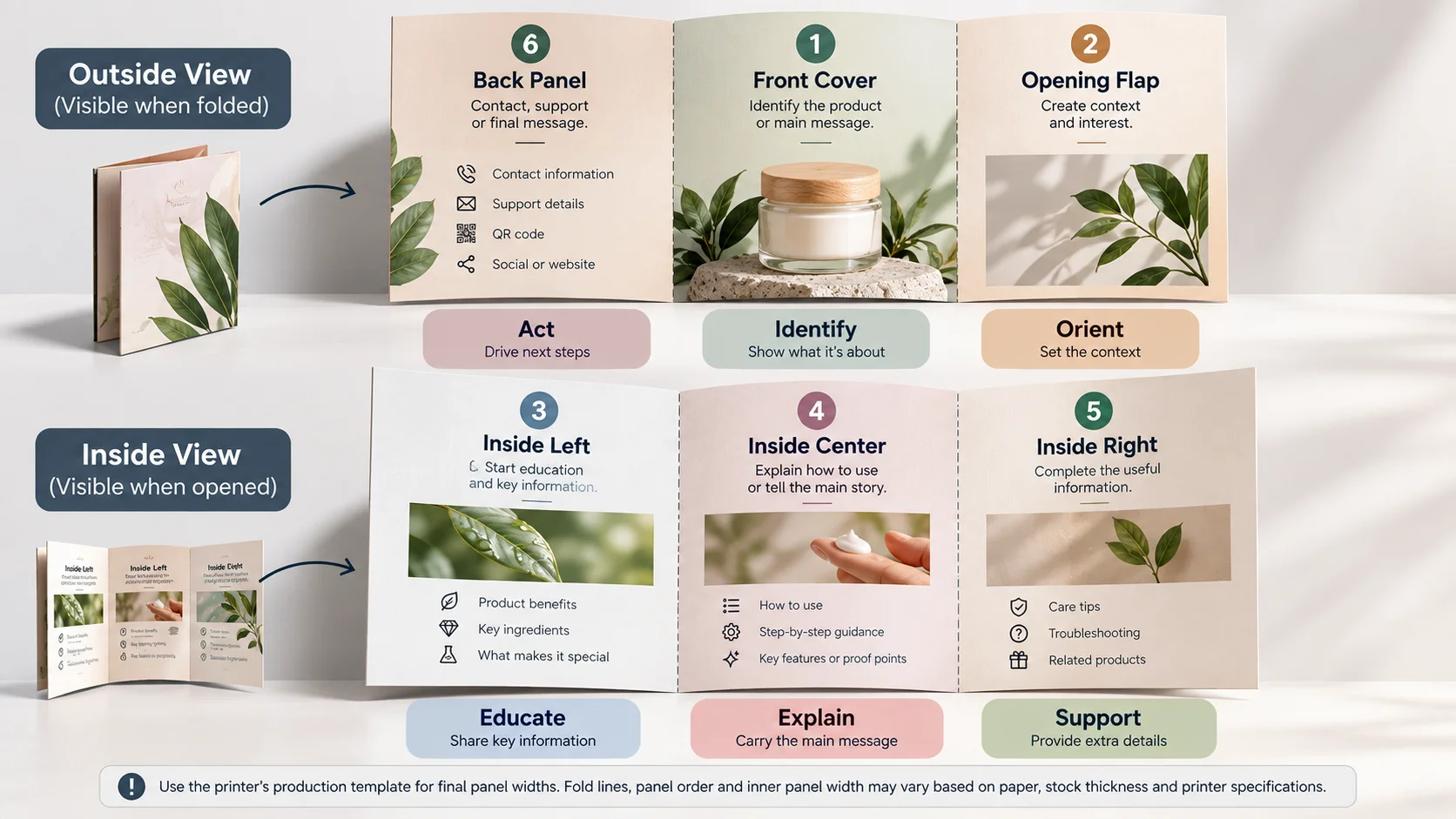
| Panel role | Primary job | Good packaging content | Avoid |
|---|---|---|---|
| Front cover | Identify the product/message | Product name, one strong visual, short promise, brand cue | Long paragraph, multiple competing headlines |
| Opening flap | Create context | Why it matters, quick benefit, how to begin | Repeating the cover |
| Inside left | Start education | What it is, key ingredients/features, first step | Dense uninterrupted copy |
| Inside center | Carry the main story | How to use, benefits, process, proof points | Tiny type and excessive claims |
| Inside right | Complete the useful information | Care, troubleshooting, complementary products, QR | Unrelated promotional clutter |
| Back panel | Close the experience | Contact, support, QR, reorder, social/contact details | Too many competing CTAs |
Recommended Panel Flow for Product Packaging
For a product-focused insert, a practical sequence is: cover → quick orientation → product benefits or ingredients → how to use → care/troubleshooting → QR/support/reorder. The exact order can change depending on the product, but the reader should never have to guess where to start.
For a natural skincare product, for example, the cover can identify the product, the opening panel can explain the intended use, the interior can cover ingredients and application steps, and the final panel can link to a detailed routine or product-support page. This is also where current sustainable packaging trends for natural skincare products in 2026 can be translated into practical decisions such as avoiding unnecessary paper, using a right-sized insert, and connecting extended information digitally.
Standard Trifold Brochure Sizes and Dimensions
The most familiar U.S. starting size is 8.5 × 11 inches. Other common starting sheets include 8.5 × 14 inches and 11 × 17 inches. A4 is common outside the U.S. These are flat-sheet dimensions; the finished folded size is smaller.
| Flat sheet size | Simple one-third folded width* | Typical folded footprint | Useful for | Packaging note |
|---|---|---|---|---|
| 8.5 × 11 in (letter) | About 3.67 in when folded across the 11-in side | About 3.67 × 8.5 in | General brochures, menus, compact inserts | Good starting point when the box has enough footprint |
| 8.5 × 14 in (legal) | About 4.67 in when folded across the 14-in side | About 4.67 × 8.5 in | More information without moving to tabloid | Useful when content is moderate and box footprint permits |
| 11 × 17 in | About 5.67 in when folded across the 17-in side | About 5.67 × 11 in | Maps, image-heavy pieces, larger information sets | Usually too large for small product boxes |
| A4 (210 × 297 mm) | About 99 mm when folded across the 297-mm side | About 99 × 210 mm | International print programs | Use the actual printer template for production |
*The one-third figure is a simple mathematical reference, not a production template. Folding, stock thickness and the tuck-in panel can change the usable panel width. Always use the printer’s final dieline/template before production.
Brochure Size: Folded vs. Flat Dimensions
A common planning mistake is to specify only the flat sheet. Packaging decisions should use the finished folded dimensions because those determine whether the insert can pass through the box opening and sit where intended.
- Measure the available opening or insert compartment.
- Allow practical clearance so the folded piece is not forced into the package.
- Check the folded thickness if the insert is placed beside a product rather than above it.
- Confirm whether the brochure must be removed before the product can be lifted out.
- Make a physical dummy before ordering a large quantity.
How to Choose a Trifold Brochure Size for a Product Box
The correct brochure size is the largest format that fits the packaging experience comfortably while leaving enough usable panel area for readable content. Bigger is not automatically better.
- Measure the available insert area inside the finished box.
- Record the folded width, folded height, and available thickness.
- Decide how much information must be printed rather than choosing a sheet size first.
- Choose the fold type and panel sequence.
- Create a paper mockup at the intended folded size.
- Test the mockup inside the actual package with the product present.
- Only then finalize the production artwork and quantity.
If the box itself still needs to be developed, start with the package rather than squeezing an existing brochure into it. BoxNovo’s custom box dimensions can be used as the packaging-side reference when the insert and box dimensions need to be considered together.
Small Cartons, Large E-Commerce Boxes and Other Packaging Examples
A carton box small enough for a single cosmetic, candle, food item, or accessory may only need a compact insert card. A larger ecommerce mailer can accommodate a folded piece with more educational content. The same principle applies to specialized formats such as an ice cream carton, carton box with lid, bakery bag, or printed paper cup: the printed piece should fit the physical package and the customer’s actual interaction with it.
For retail packaging, a brochure can also complement the primary package rather than compete with it. A packaging label identifies the product on the outside; the insert can explain what the label cannot. A blind box package, for example, may benefit from a short insert explaining the collection or care instructions, while a clothing package may use a hang tag for immediate product identification and a separate folded insert for care or brand storytelling.
Letter Fold vs. Z-Fold: Which Is Better for Packaging?
Both formats use two folds and six panels, but they create different reading experiences.
| Factor | Letter fold / standard trifold | Z-fold | Packaging implication |
|---|---|---|---|
| Opening | Outer panel folds inward | Panels alternate direction | Letter fold creates a more booklet-like reveal |
| Reading flow | Cover-to-inside sequence | Sequential/accordion flow | Z-fold works well for steps or timelines |
| Panel visibility | Interior spread opens as a larger canvas | Panels can reveal in sequence | Choose based on how the customer should consume information |
| Production | Requires correct tuck-in panel setup | Requires correct alternating fold setup | Use the printer’s template for either format |
When a Z-Fold May Make More Sense
A Z-fold is useful when the information has a strong linear sequence: three product-use steps, a timeline, a recipe, a care process, or a short visual story. If the insert needs a clear front cover and a conventional inside spread, a standard letter-fold trifold may be easier to understand.
How to Design a Trifold Brochure for Packaging
Design from the customer’s task, not from the available empty space.
- Define the reader and the single most important job of the insert.
- Write the content before decorating the panels.
- Assign one clear purpose to each panel.
- Place the most important information early in the reading sequence.
- Use headings, bullets, short paragraphs and diagrams to make small panels scannable.
- Keep critical text, faces, QR codes and small icons away from folds and trim edges.
- Use one visual system across all six panels.
- Print and fold a physical proof before approving production.
How Much Content Fits on a Trifold?
There is no universal word limit because type size, images, panel dimensions, language length, and paper size all change the usable area. Instead of targeting a word count, decide what the customer must understand after opening the insert.
- One primary idea per panel is a useful starting rule.
- Use short paragraphs and bullets for instructions.
- Move extended details to a QR-linked digital page when practical.
- Do not reduce type simply to fit more copy.
- If the content needs several pages of instructions, use a booklet or dedicated manual instead.
Typography, Images and Color
A trifold has less uninterrupted reading area than a full page, so typography has to carry the hierarchy. Use a clear heading system, readable body text, enough contrast, and consistent spacing. Two or three type families or carefully chosen weights are usually easier to manage than a panel full of competing styles.
Images should explain or reinforce the content. For a packaging insert, that may mean a product-use photograph, ingredient illustration, assembly diagram, care icon, or a simple step-by-step visual. A full-bleed image across the interior spread can work, but only if the important subject matter does not disappear into a fold.
The same principle applies to printed color pages: color should establish hierarchy and brand recognition, not make every panel equally loud. A restrained palette often leaves more room for the information that matters.
Print-Ready Trifold Setup
Print specifications vary by printer and production method, so the printer’s template should always control the final file. Common professional setup conventions include the following:
| Element | Common planning convention | Why it matters |
|---|---|---|
| Bleed | Often 0.125 in / 3 mm when required by the printer | Prevents white edges when artwork runs to trim |
| Safe area | Keep critical text and important details away from trim and folds | Reduces the risk of visually burying information in production |
| Images | 300 PPI is a common print-production target for placed raster images | Helps maintain sharp output at final size |
| Color | CMYK is commonly requested for commercial print | Provides a print-oriented color workflow; confirm with printer |
| Fold guides | Use the printer’s panel and fold template | Prevents wrong panel order and incorrect tuck-in width |
| Proof | Print, fold and inspect a physical sample | Catches layout and fit issues that a screen preview can hide |
These are production conventions, not a universal specification for every print job. Confirm bleed, color profile, safe zones, resolution requirements, paper, and fold tolerances with the company producing the brochure.
Why the Inward-Folding Panel May Need to Be Narrower
A three-column grid is not always a three-equal-panel production file. In a letter fold, the panel that tucks inside can need a small width adjustment so the folds close cleanly without buckling. The exact allowance depends on the paper, coating, number of folds, finishing method and printer.
This is one of the reasons a generic online template can be useful for concept development but should not automatically be treated as a manufacturing template.
Paper Weight and Finish
Paper should support the intended use. A lightweight insert may need to fold easily and add little bulk. A premium leave-behind may benefit from a heavier stock, but heavier material can require different folding or scoring considerations.
| Option | Typical reason to choose it | Packaging consideration |
|---|---|---|
| Light/text-weight stock | Easy handling and folding | Useful for inserts where bulk matters |
| Heavier text stock | More substantial feel without becoming a board | Check fold behavior and package clearance |
| Cover stock | Premium, durable presentation | May need scoring or special folding treatment |
| Matte finish | Readable, restrained appearance | Good when customers need to read instructions |
| Gloss finish | Strong color/photo impact | Consider reflections under bright light |
| Satin/silk-style finish | Balance between matte and gloss | Confirm available stock and folding behavior |
Trifold Brochures vs. Other Packaging Inserts
The trifold is not the default answer for every package. The format should match the amount and type of information.
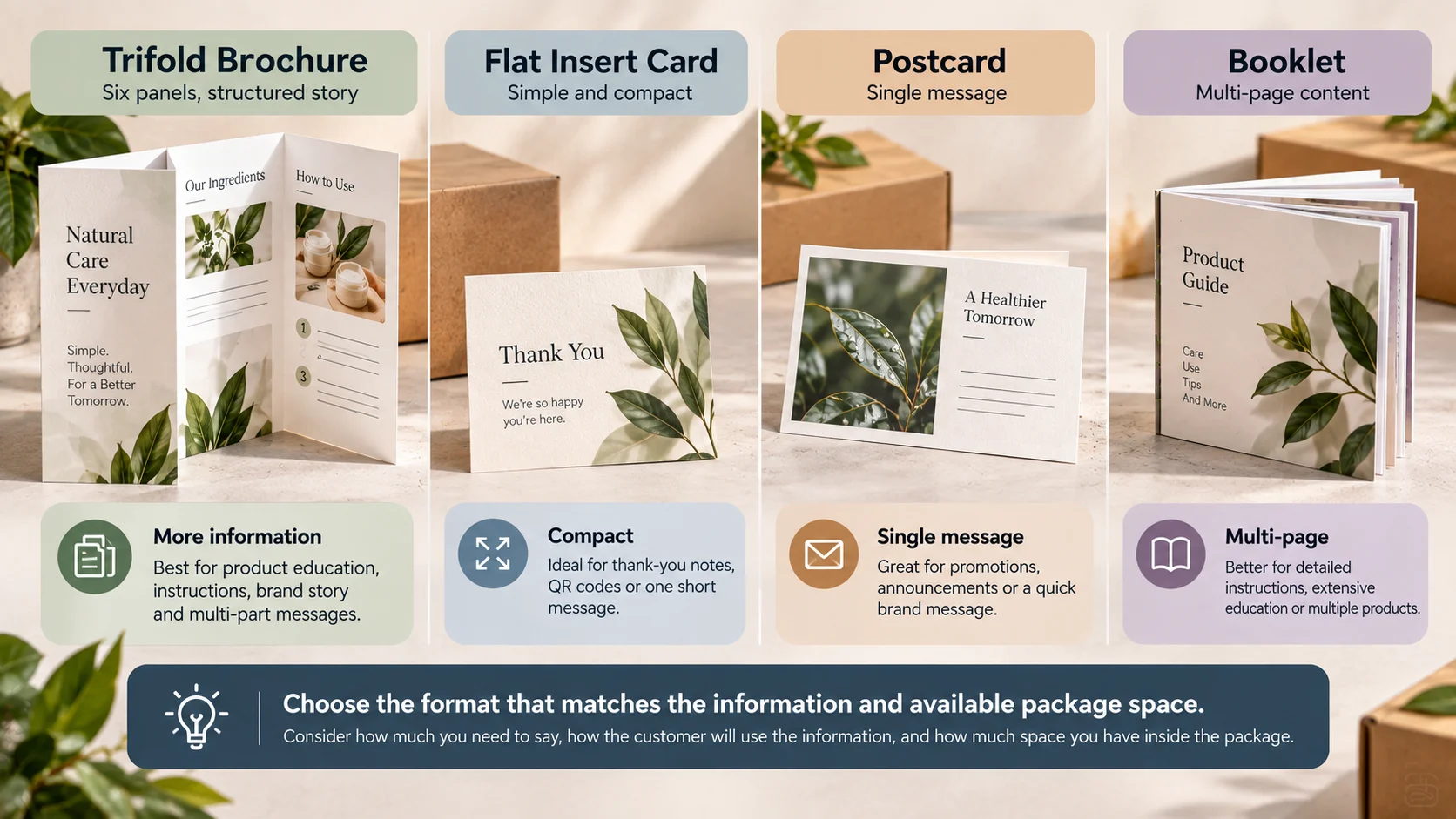
| Insert type | Choose it when | Main advantage | Main limitation |
|---|---|---|---|
| Flat insert card | You need a thank-you, QR or one short message | Simple and compact | Limited information |
| Trifold brochure | You need a structured multi-part message | Six panels without booklet binding | More setup and folding |
| Postcard | One side or two sides can carry a simple message | Fast to scan | No fold-based sequencing |
| Booklet | Instructions or education are extensive | More room and page flexibility | More material and production complexity |
| Product catalog | Several products or SKUs need coverage | Organizes multiple products | Often excessive for one-purchase inserts |
| Zine / magazine-style insert | Brand story or editorial content is central | Distinctive storytelling format | Less efficient for short instructions |
| Hang tag | The information must remain attached to the product | Immediately visible at retail | Small area |
Trifold Brochures for E-Commerce Packaging
Ecommerce packaging gives the insert a useful moment: the customer has already chosen the product and is now physically opening it. The insert can turn that moment into education rather than another generic advertisement.
- Use the cover to confirm the product and establish the first message.
- Use interior panels for setup, usage, care, or product education.
- Use a QR code for information that would otherwise make the insert too dense.
- Include reorder or support information only when it is genuinely useful.
- Keep promotional content secondary to the customer’s immediate needs.
For ecommerce brands, the physical insert works best when it matches the rest of the package. BoxNovo’s ecommerce-ready mailer packaging can be considered alongside the insert when the goal is a coordinated unboxing system.
How a Trifold Fits Inside a Box
The insert should be treated as part of the package architecture, not an object added at the end.
| Placement | Best suited to | Watch for |
|---|---|---|
| Under the lid | Welcome, brand story, quick-start information | Customer may see it before the product |
| Above the product | First-use instructions or welcome message | Do not hide the product reveal unnecessarily |
| Beside the product | Detailed instructions or care | Requires sufficient side clearance |
| Under the product | Support, reorder, care information | Easy to miss; use only when placement is intentional |
| Dedicated insert compartment | Premium presentation and repeatable placement | Adds packaging engineering considerations |
If the package needs an integrated product-retention or presentation structure, a rigid presentation boxes with built-in inserts may be more appropriate than relying on the brochure alone to control placement.
Trifold Brochures Across Packaging Types
The same folded format can serve very different roles depending on the product and package.
- Cosmetics and skincare: routines, ingredient education, application instructions, and QR-linked extended information.
- Food and bakery: serving suggestions, product story, storage guidance, recipes, or brand information. A bakery bag or food box may need only a compact card if space is limited.
- Gift packaging can use a brochure for brand story, care instructions, gift-use guidance, or a personalized message. When the package itself needs to be part of the presentation, explore custom gift packaging as the structural companion to the insert.
- Retail products: product education, comparison information, care, warranty/support direction, or cross-sell guidance.
- Blind box packaging: collection information, character/product details, or care information where appropriate.
- Apparel: care information can remain on a hang tag while a larger insert handles brand story or loyalty messaging.
- Specialty food/beverage formats: a printed paper cup, ice cream carton, or shrink sleeve packaging usually carries its primary message directly on the package; a trifold makes sense only when additional information genuinely needs a separate surface.
If you are comparing a carton, mailer, rigid package or other box format, BoxNovo’s made-to-fit product packaging provide a useful starting point for thinking about the package and insert as one coordinated system.
Product Catalog vs. Tri fold Brochure
A product catalog and a trifold brochure solve different problems. A catalog is designed to organize multiple products, variations or SKUs. A trifold is better when the reader needs a compact guided explanation.
- Choose a trifold when the customer needs one product explained clearly.
- Choose a catalog when the customer needs to compare multiple products.
- Choose a booklet when instructions or educational content exceed the practical capacity of six panels.
- Choose a postcard when one short message is enough.
Sustainable Trifold Brochures for Packaging
Sustainability is not achieved by adding a sustainability message to an oversized insert. The better approach is to question whether the printed piece needs to exist, how much material it requires, and how much information can be moved to a useful digital destination.
- Right-size the insert to the package and the information.
- Avoid printing information that will become outdated quickly when a maintained digital page is more practical.
- Use QR codes to extend information rather than shrinking type to fit everything.
- Avoid unnecessary duplicate cards, flyers and inserts.
- Coordinate the insert with the box so the entire packaging system serves a purpose.
- Ask the printer about available recycled or responsibly sourced paper options when those attributes matter to the project.
For the package itself, material selection should be considered separately from the brochure. BoxNovo’s packaging material choices can help frame that broader packaging decision.
Common Trifold Brochure Mistakes
- Designing three equal columns without checking the production template.
- Putting critical text, QR codes or faces directly on fold lines.
- Trying to fit too much information by shrinking type.
- Choosing the paper before deciding how the insert will be handled.
- Designing the insert before measuring the finished package.
- Using a digital template as though it were automatically a manufacturing template.
- Ignoring the difference between a letter fold and a Z-fold.
- Skipping the physical fold test.
- Adding multiple competing calls to action.
- Treating the insert as separate from the box design.
- Using outdated mailing assumptions. Postal requirements can change; verify current USPS rules if the brochure will be mailed as a self-mailer.
If the Trifold Will Be Mailed Instead of Placed in a Box
A brochure that goes inside a package is different from a brochure that becomes the mailpiece. If you intend to mail the folded brochure without an envelope in the United States, use the current USPS folded self-mailer requirements rather than relying on a generic brochure guide.
USPS specifies physical characteristics and sealing requirements for folded self-mailers, including size, thickness, weight, panel and tab/sealing rules. Current requirements should be checked against the intended mailpiece design before production. Review the current USPS Postal Explorer standards.
This distinction matters because “a brochure that can fold” and “a brochure that qualifies for a particular postal category” are not the same thing. Mailing class, dimensions, thickness, weight, fold orientation and closure can affect preparation and postage.
A Practical Tri fold Brochure Printing Checklist
- Confirm the final folded dimensions.
- Confirm the flat sheet size and orientation.
- Confirm the fold type: letter fold or Z-fold.
- Use the printer’s production template.
- Verify panel order on both sides.
- Keep important content away from trim and folds.
- Confirm bleed requirements with the printer.
- Confirm image resolution and color requirements.
- Check QR code size and scanability at the final printed size.
- Print and physically fold a proof.
- Place the folded proof inside the actual package.
- Check the insert with the product in the box, not by itself.
- Review copy, contact information, URLs and QR destinations.
- Confirm paper/finish and folding behavior.
- Approve production only after the physical fit and reading sequence work.
A Simple Decision Framework: Do You Actually Need a Trifold?
Use this quick decision sequence before designing.
- Does the customer need more than one short message? If no, use a compact card.
- Does the content naturally break into several related sections? If yes, a trifold may fit.
- Does the customer need a sequential story or step-by-step reveal? Consider a Z-fold.
- Does the content require several pages? Consider a booklet.
- Will the piece fit the package without damaging the product experience? Test it physically.
- Can a QR code extend the information without reducing readability? Use it where useful, not as decoration.
- Will the printed piece remain useful after the unboxing moment? If yes, give it durable, reference-worthy content.
How a Trifold Can Work With Custom Packaging
The strongest packaging systems are designed as a group: box structure, exterior graphics, product protection, insert placement, printed information and the customer’s sequence of interaction.
That is why the brochure should not be designed in isolation. If the insert is too large, it can make the package difficult to close. If it is too small, it may disappear beneath the product. If the box has no planned insert area, the brochure can shift during shipping. If the insert and box use unrelated visual systems, the experience can feel disconnected.
When the packaging itself needs to be developed around a specific product and insert, explore custom packaging for the full box-and-insert system and treat the brochure’s folded size as one of the package-development inputs.
A Better Workflow: Design the Box and Insert Together
- Define the customer’s post-purchase information needs.
- Measure the product and decide how the package will present it.
- Reserve the physical area for the insert.
- Choose the insert format and folded dimensions.
- Create the box structure around the product, insert and required clearance.
- Develop the brochure panel architecture and visual system.
- Prototype the box and insert together.
- Test the unboxing sequence with the product inside.
- Finalize production files only after the physical system works.
Frequently Asked Questions
What is the definition of a trifold brochure?
A trifold brochure is a single sheet folded twice to create six panels. The most common version is the letter fold, where the outer panels fold inward; a Z-fold uses alternating fold directions.
What is the standard trifold brochure size?
A common U.S. starting size is 8.5 × 11 inches. A4, 8.5 × 14 inches and 11 × 17 inches are also used. The finished folded dimensions depend on the sheet size, fold style and production setup.
What are the dimensions of an 8.5 × 11 trifold brochure?
A letter-size sheet is commonly oriented as 11 × 8.5 inches for a three-panel horizontal fold, giving a simple one-third planning width of about 3.67 inches. The final panel widths can differ slightly because of the fold style, stock thickness, and tuck-in allowance, so use the printer’s template for exact production dimensions.
Are all three panels the same width?
Not necessarily. The panel that tucks inward may need to be slightly narrower so the brochure folds cleanly. The exact allowance depends on stock, coating, fold method and printer specifications.
What is the difference between a trifold and a Z-fold?
A standard letter-fold trifold folds the outer panels inward, while a Z-fold alternates the fold direction like an accordion. A letter fold creates a more conventional cover-and-interior reading experience; a Z-fold is useful for sequential content.
Can a trifold brochure be used as a packaging insert?
Yes. It can be useful when a package needs several related pieces of information such as product education, instructions, care, brand story and a QR-linked resource. For a very short message, a smaller flat insert may be more efficient.
What size trifold should go inside a product box?
Choose the folded size based on the available insert area inside the finished package, then test the brochure with the product present. Do not choose the brochure size first and assume the box will accommodate it.
What paper is best for a trifold packaging insert?
The appropriate stock depends on handling, fold behavior, desired feel, package clearance and printing method. Lighter stocks are easier to fold and add less bulk; heavier stocks can feel more premium but may require different folding or scoring.
How much bleed does a trifold brochure need?
0.125 inch (3 mm) is a common print setup convention, but bleed requirements vary by printer. Follow the production template supplied for the job.
What resolution should images use?
300 PPI is a common target for placed raster images in print production. The printer’s specifications and the final image size should control the actual file preparation.
Can a trifold include a QR code?
Yes. A QR code can connect the physical insert to instructions, support, product education, reorder information or another useful digital destination. Test the printed code at final size before production.
Should a product catalog be a trifold brochure?
Usually only when the catalog is very small and the number of products is limited. A catalog with many products or SKUs generally benefits from a booklet or catalog format with more page area.
Can a trifold brochure be mailed without an envelope?
Some folded brochures can be prepared as folded self-mailers, but postal eligibility depends on the mailpiece’s dimensions, weight, thickness, fold orientation and sealing. In the U.S., check current USPS requirements before production.
What should go on the back panel?
For a packaging insert, the back panel can carry support information, a QR code, reorder direction, contact information or a concise final message. If the brochure is a postal self-mailer, postal addressing requirements can change what belongs there.
What is a brochure used for in packaging?
It can educate the customer, explain usage, provide care information, tell the brand story, support the product with a QR-linked digital resource, or guide the customer toward a useful next step.
Is a trifold better than a packaging insert card?
Neither is universally better. A trifold is useful when the information naturally needs several panels. A flat insert card is usually more efficient when the message is short and the package has limited space.
Final Takeaway
A trifold brochure is most useful when its six panels solve a real communication problem. For packaging, that means more than dividing an 8.5 × 11 sheet into three columns. The brochure has to fit the package, follow a deliberate reading sequence, use an appropriate fold, remain readable after printing, and give the customer information worth keeping.
The most reliable approach is to design the insert and package together: measure the finished box, determine what the customer needs to know, assign a job to every panel, use the printer’s production template, create a physical proof, and test the folded insert inside the actual package.
When the box itself needs to be customized around the product and insert, the structural and printed parts of the customer experience should be planned together.