
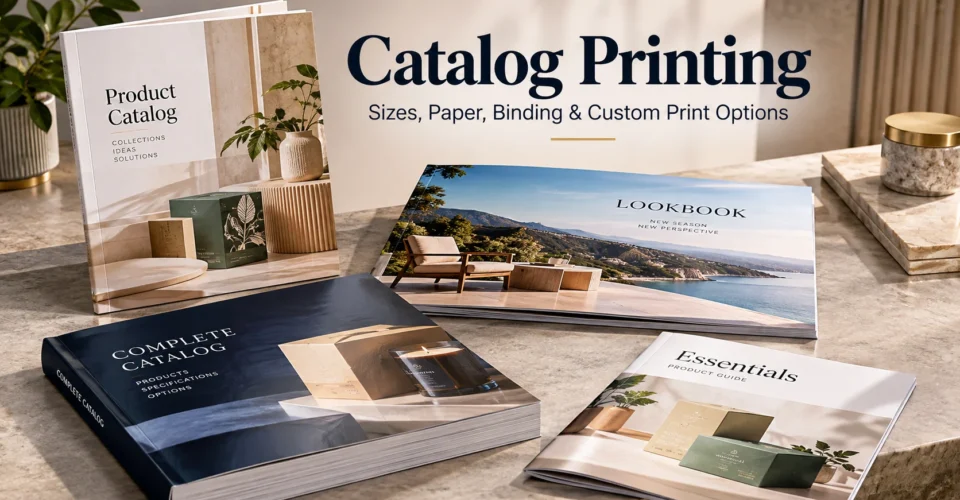
Catalog printing works best when you treat the job as one connected system. The right size affects layout and paper use; page count affects binding and thickness; paper changes image reproduction and handling; printing method affects run economics; and finishing can change both appearance and durability.
If you are comparing custom catalog printing options, do not start by asking only for a size or a price. Start with what the catalog needs to accomplish, who will use it, how much information it contains, where it will be distributed, and how it will be handled. Those answers make the rest of the specification much easier to choose.
This guide walks through the decisions in order, from format and page count to catalog paper, printing methods, catalog binding, finishing, artwork, proofing and cost. It also explains how to organize a product catalog so the printed piece helps buyers find, compare and understand products rather than simply displaying pages of information.
What Is Catalog Printing?
Catalog printing is the production of a multi-page printed publication used to organize and present products, services, collections or technical information. Unlike a short promotional piece, a catalog is normally built for browsing and reference: readers may return to it to compare products, review specifications, identify a product code or decide what to order.
A catalog can be simple or highly detailed. A short seasonal product guide may need only a few sections, while a wholesale or technical catalog may contain hundreds of products, specifications, indexes and cross-references.
| Format | Primary job | Typical content pattern |
|---|---|---|
| Catalog | Reference, comparison and product/service selection | Categories, products, images, specifications, options, pricing/order information where appropriate |
| Brochure | Promotion and quick persuasion | Key benefits, selected products/services, concise brand story and CTA |
| Lookbook | Visual storytelling and collection presentation | Large imagery, lifestyle content, limited technical detail |
| Product sheet | Focused product information | One product or small group, specifications, features and ordering information |
| Manual / guide | Instruction and reference | Procedures, technical information, diagrams and troubleshooting |
The distinction matters because the format should follow the reader’s job. If customers need to compare many products, a catalog structure is usually more useful than trying to force the same information into a brochure-style layout.
Start With the Job Your Catalog Needs to Do
Before choosing paper or binding, define the job. A catalog for a retail customer does not necessarily need the same structure as a dealer catalog, technical parts reference or trade-show handout.
A useful rule is simple: the catalog specification should make the reader’s task easier. If the reader is comparing products, optimize for comparison. If the reader is carrying the catalog between sales meetings, weight and durability matter more. If the catalog lives on a counter and must stay open, binding behavior becomes a functional decision rather than a cosmetic one.
| Catalog purpose | What the reader needs | Specification implication |
|---|---|---|
| Retail / product discovery | Visual browsing, categories, product benefits, easy comparison | Prioritize strong photography, scannable layouts and a format that displays imagery well. |
| Wholesale / B2B | SKUs, variants, specifications, ordering information | Prioritize consistency, navigation, dense but readable product data and durable handling. |
| Technical parts | Part numbers, dimensions, compatibility and reference information | Prioritize indexing, repeatable data fields, legibility and reference-friendly binding. |
| Premium / luxury | Brand experience and visual presentation | Consider higher-quality paper, controlled typography and selective finishing. |
| Seasonal / campaign | Current collection or promotion | Keep the production flexible enough for changing versions and quantities. |
| Trade show / sales | Fast browsing and follow-up reference | Balance portability with enough product information to support sales conversations. |
How to Choose the Right Catalog Size and Orientation
There is no single best catalog size. The right format depends on the amount of content, image proportions, portability, distribution method, display environment and production constraints.
Portrait catalogs
Portrait formats work well when the catalog contains a mixture of product images, descriptions, specifications and structured text. They are familiar, easy to read and adaptable to many product categories.
Landscape catalogs
Landscape formats can be useful when wide product photography, diagrams, collections or visual spreads are central to the presentation. They can also create a more editorial feel, but the wider page should have a clear purpose rather than being selected only for visual novelty.
Square catalogs
Square formats can create a distinctive presentation for fashion, lifestyle, luxury and image-led collections. The trade-off is that a custom or less-standard format can affect paper efficiency, production options, mailing and storage.
Custom sizes
A custom size makes sense when the catalog’s content or physical use genuinely benefits from it, for example, an unusual product shape, a display environment with specific constraints or a visual concept that depends on a particular proportion. Do not choose a custom size simply because it looks different.
| Format direction | Best suited to | Watch for |
|---|---|---|
| Portrait | Mixed product information, descriptions and specifications | Very dense pages can become difficult to scan if hierarchy is weak. |
| Landscape | Wide imagery, diagrams, visual collections | Long text can become harder to read if line lengths are excessive. |
| Square | Lifestyle, fashion, premium visual presentation | Paper efficiency, mailing and storage can be less straightforward. |
| Custom | Special presentation or physical-use requirements | Potential production, paper and distribution implications; confirm feasibility early. |
Plan Page Count Before You Design
Page count should be planned from the content structure, not discovered after the design is finished. Build a simple flatplan first: list every section, category, product group, index, introduction, ordering page and other required content, then estimate the space each part needs.
Page count affects more than paper. It can influence binding, thickness, creep, navigation, cover construction, production time and cost. The available page-count options also depend on the binding method and printer.
Why page counts often move in multiples of four
Folded sheets create groups of pages, which is why many booklet-style production systems use page counts in multiples of four. The exact way a printer counts covers and available page options can vary, so confirm the final counting convention before the layout is locked.
What is creep?
Creep is the gradual movement of inner pages toward the outside edge that can occur as folded sheets are nested in a thicker saddle-stitched publication. It becomes more important as the piece gets thicker. A professional prepress workflow can compensate for the effect; do not manually guess at page shifts unless your printer specifically instructs you to.
Build the flatplan first
A flatplan is a page-by-page map of the publication. It lets you catch problems before design time is spent on them.
- Front cover and inside-cover content, if used.
- Table of contents or navigation.
- Category introductions.
- Product pages or product spreads.
- Technical/specification pages.
- Indexes, comparison charts or ordering information.
- Back matter, contact details and back cover.
If your planned content lands awkwardly, it is usually better to add a useful page, such as an index, comparison chart, size guide or category divider, than to leave accidental blank space.
Choose Catalog Paper Based on the Job
Catalog paper should be selected according to what the pages need to do. Image reproduction, text readability, glare, writing ability, tactile feel, durability, thickness and budget all matter.
Coated vs. uncoated
Coated paper has a treated surface that can support crisp image reproduction and strong color. It is often considered for product catalogs where photography carries much of the selling message. Uncoated paper has a more natural surface and can be preferable when readability, writing or tactile feel matters.
Gloss vs. matte
Gloss can emphasize saturated photography and sharp visual detail, while matte or similar lower-reflection surfaces can make text-heavy pages more comfortable under some lighting conditions. The decision should follow the catalog’s environment, not a blanket rule that one finish is always more premium.
Paper weight is not the whole story
Paper weight is only one part of the physical result. Two papers with different construction can feel different even when their stated weights appear similar. If the catalog’s thickness, feel or durability matters, ask the printer about the actual stock and finished result rather than choosing from weight alone.
| Paper direction | Strength | Good fit | Trade-off |
|---|---|---|---|
| Coated gloss | Strong color and image reproduction | Photography-heavy product catalogs | Can produce more glare under strong lighting. |
| Coated matte / silk-style | Controlled appearance with less glare than gloss | Premium catalogs that mix imagery and substantial text | Surface and availability vary by printer. |
| Uncoated | Natural feel and easier writing | Editorial, technical or writable reference material | Ink behavior and image appearance differ from coated stock. |
| Heavier cover stock | More structure and protection | Catalogs that receive repeated handling | Adds weight and can affect binding or mailing. |
| Lighter interior stock | Reduces bulk and weight | Longer publications | May provide a less substantial feel than heavier stock. |
Digital vs. Offset Catalog Printing
Digital and offset printing can both produce professional catalogs. The better choice depends on quantity, versioning, color requirements, paper, schedule, finishing and the printer’s production setup.
There is no trustworthy universal quantity at which digital automatically becomes better or offset automatically becomes better. Request comparable quotes using the same finished size, page count, paper, color coverage, binding, finishing, quantity and delivery requirements.
| Factor | Digital printing | Offset printing |
|---|---|---|
| Short runs | Often well suited to shorter quantities and testing. | Setup can make very small runs less economical. |
| Large runs | Can remain viable depending on specifications. | Often becomes more competitive as volume increases. |
| Multiple versions | Useful when different files or versions are needed. | Multiple versions can introduce additional setup considerations. |
| Speed / workflow | Direct-to-press workflow can simplify short-run production. | Plate-based production adds setup steps but can be efficient at scale. |
| Best decision method | Compare an actual quote for the complete specification. | Compare an actual quote for the complete specification. |
Catalog Binding: Which Option Fits Your Use Case?
Binding should be chosen after you understand the page count and how the catalog will be used. A binding is not “better” simply because it costs more; it is better only when its behavior fits the job. If a longer catalog starts to overlap with book-style production requirements, BoxNovo’s book printing guidance can also be useful for comparing related publication considerations.
| Binding | How it behaves | Best suited to | Main trade-off |
|---|---|---|---|
| Saddle stitch | Folded sections are secured through the center fold. | Shorter, lightweight catalogs and booklets where a simple opening is sufficient. | Limited by thickness and available production range; creep can matter in thicker pieces. |
| Perfect binding | Pages are gathered and glued into a square spine. | Thicker catalogs, shelf/display use and publications that benefit from a printable spine. | Does not provide the same lay-flat behavior as coil. |
| Spiral / coil | Pages are punched and held by a coil. | Reference catalogs, manuals and workbooks that need to stay open. | Coil changes the edge profile and may not suit every premium visual concept. |
| Section-sewn | Signatures are sewn before finishing/binding. | Premium or durability-focused publications when the printer offers it. | More specialized and typically more production-intensive. |
A better binding decision
- Confirm the final or estimated page count.
- Consider the finished thickness and paper stock.
- Ask whether the catalog needs to stay open on a counter or desk.
- Decide whether a printable spine matters for shelving or identification.
- Consider how often the catalog will be handled.
- Confirm the printer’s available binding range for your exact format and stock.
This approach is more reliable than copying a fixed page threshold from another printer. Published page ranges are useful examples of production logic, but they are not universal specifications for every printer. For shorter catalog formats, BoxNovo’s booklet print options can also be a useful related reference when the project is closer to booklet production.
Catalog Design That Makes Products Easier to Compare
A strong product catalog is not just a collection of attractive pages. Its layout should help a reader answer the same questions repeatedly: What is this product? Which version is it? What makes it different? What are its specifications? What should I compare it with? How do I order or learn more?
Build a repeatable product-page system
- Category or section label.
- Product name and product code/SKU.
- Primary product image.
- Short benefit-oriented description.
- Key specifications.
- Available sizes, colors, variants or options where relevant.
- Price or ordering information where appropriate.
- Cross-reference to related products.
Consistency is more valuable than novelty. If every product page changes structure, the reader has to relearn how to scan the catalog on every spread. A repeatable grid makes comparison faster and makes large catalogs feel more organized. When the catalog also needs to align visually with physical product presentation, BoxNovo’s packaging design resource can provide useful context for keeping structure, graphics and brand presentation consistent.
Product Catalog Content Architecture
The biggest opportunity to improve a catalog is often not the printing specification, it is the information architecture. A printed catalog should make product data easy to find, compare and trust.
| Content layer | What to include | Why it matters |
|---|---|---|
| Category | Clear category name and short context | Helps readers understand where they are. |
| Product identity | Product name, SKU/part number or code | Prevents confusion between similar items. |
| Visual | Consistent product photography or technical illustration | Makes recognition and comparison easier. |
| Description | Concise benefits and relevant use information | Explains why the product matters without overcrowding. |
| Specifications | Dimensions, materials, capacities, compatibility or other relevant fields | Supports informed purchasing decisions. |
| Variants | Sizes, colors, scents, configurations or options | Makes the range understandable. |
| Ordering information | Pricing, MOQ, contact or ordering path when applicable | Turns information into an actionable next step. |
| Navigation | Contents, index, cross-references or section markers | Reduces search time in longer catalogs. |
For technical or wholesale catalogs, consistency becomes even more important. Product data should have a controlled structure so that dimensions, codes, specifications and revision information do not change format from one page to another.
Print-Ready Catalog Artwork
A visually correct design file is not automatically a production-ready file. Before submitting artwork, confirm the printer’s current file requirements for color, bleed, trim, image resolution, fonts, PDF export and page order.
CMYK vs. RGB
RGB is designed for light-emitting screens, while commercial print workflows commonly use CMYK or another specified color process. Converting late can change color appearance, especially for brand colors and saturated imagery. Ask the printer which color profile and workflow they require.
Image resolution
Images that look sharp on a phone or monitor may not contain enough effective resolution for their final printed size. Check the image at the size it will actually appear on the page, not only its pixel dimensions in isolation.
Bleed, trim and safe area
If artwork runs to the edge of a page, the design normally needs extra image or background beyond the trim line so small cutting variation does not create an unwanted white edge. Keep important text and logos safely inside the trim area. The exact bleed and safety values should come from the printer’s current specification.
PDF and fonts
Use the file format and PDF standard requested by the printer. Confirm font handling, linked assets, transparency and image settings before export. Do not assume that one PDF preset works for every production environment. If the artwork is being prepared in Canva, BoxNovo’s Canva print guide covers practical print-file preparation considerations.
Catalog Finishing Options
Finishing should have a purpose. It can protect a cover, improve tactile experience, emphasize a brand element or create a distinctive presentation, but every added process also affects production and cost.
| Finish | Primary effect | Use when |
|---|---|---|
| Gloss / matte lamination | Surface protection and changed visual/tactile appearance | The cover will be handled frequently or needs a particular surface look. |
| Soft-touch | Velvety tactile feel | The physical feel is part of a premium brand experience. |
| Spot UV | Selective high-gloss contrast | A logo, image or detail benefits from selective emphasis. |
| Foil | Metallic or specialty visual accent | A small number of premium brand elements need emphasis. |
| Die-cutting | Custom shape or opening | The physical format adds useful differentiation or supports a specific concept. |
For many catalogs, a controlled cover finish provides more value than applying specialty effects throughout the publication. The right question is not “What finishes can we add?” but “Which finish improves this catalog’s job?”
What Affects Catalog Printing Cost?
There is no reliable single price for catalog printing because the finished specification drives the production cost. The most useful way to control the budget is to understand which variables you can change.
| Cost factor | What changes | Potential budget lever |
|---|---|---|
| Quantity | Setup and unit economics change with volume. | Compare realistic run sizes instead of ordering far more than needed. |
| Page count | Adds paper, printing and sometimes binding complexity. | Remove low-value pages or combine information where appropriate. |
| Finished size | Changes paper usage and production format. | Use a standard efficient format unless a custom size has a clear purpose. |
| Paper | Changes appearance, feel, weight and price. | Choose stock based on content and handling, not weight alone. |
| Color coverage | More color/ink coverage can affect production. | Use full color where visuals require it and avoid unnecessary complexity. |
| Binding | Changes materials and production steps. | Choose the simplest binding that genuinely fits the use case. |
| Finishing | Adds processing and material costs. | Concentrate premium effects where they create real value. |
| Design / prepress | Professional design, corrections and file preparation add service cost. | Finalize product data early to reduce avoidable revision cycles. |
| Shipping / distribution | Weight, destination and packaging affect delivered cost. | Plan distribution before choosing an unusually heavy format. |
| Versions | Different artwork/SKU editions can create additional setup or production work. | Use shared layouts and controlled content where possible. |
When comparing catalog printing services, send each printer the same specification. A quote that looks cheaper may simply be using a different page count, paper, binding, finishing level, quantity or delivery assumption.
How to Proof a Catalog Before It Goes to Press
Proofing is where content accuracy and physical production meet. A beautiful catalog with one incorrect SKU, price, dimension or page reference is still a production failure.
Content proof
- Product names and codes.
- Prices, specifications and units.
- Variant names and availability.
- Contact information and URLs.
- Table of contents and page references.
- Index entries and cross-references.
Visual proof
- Image cropping and orientation.
- Color-sensitive brand elements.
- Text hierarchy and legibility.
- Bleed and trim.
- Margins and safe areas.
- Page order and spreads.
- Cover and spine text where applicable.
Version control
Lock the final approved file with a clear version name and date. Make sure the printer is working from the approved file, not an earlier revision sent during the design process.
Common Catalog Printing Mistakes
| Mistake | Why it happens | Better approach |
|---|---|---|
| Choosing paper before defining the catalog’s job | Paper is treated as an isolated aesthetic choice. | Choose paper after understanding imagery, text, handling and budget. |
| Choosing binding before page count | Binding is selected from appearance alone. | Finalize the content map and page count first. |
| Using low-resolution images | Screen images look acceptable at small sizes. | Check effective resolution at final print size. |
| Designing only in RGB | Screen-first design workflows hide print differences. | Follow the printer’s specified color workflow. |
| Missing bleed or safe area | The file is built only to the visible trim. | Use the printer’s exact bleed and safety specification. |
| Inconsistent product data | Information is collected from multiple sources without control. | Use a controlled product-data sheet before layout. |
| Overcrowding pages | The team tries to fit every detail into every spread. | Prioritize information and move secondary details to logical reference areas. |
| Skipping proofing | The deadline creates pressure to approve quickly. | Proof content and production details before release. |
| Treating competitor specs as universal | A published range looks like an industry standard. | Confirm the exact printer’s capabilities for the job. |
| Adding finishes without a purpose | Premium effects are used to make a catalog feel expensive. | Use finishing only where it improves appearance, function or brand experience. |
Catalog Printing Pre-Press Checklist
| Check | Final question |
|---|---|
| Purpose | Is the catalog’s audience and job clearly defined? |
| Content map | Has every required section and product group been planned? |
| Size | Is the finished size confirmed with the production provider? |
| Page count | Is the final count compatible with the chosen binding and printer? |
| Paper | Is the stock appropriate for images, text, handling and budget? |
| Binding | Does the binding fit the thickness and intended use? |
| Color | Is the artwork prepared to the printer’s required color workflow? |
| Bleed / safe area | Do all edge-to-edge and critical elements meet the supplied specification? |
| Images | Are all images suitable at their final placed size? |
| Fonts / assets | Are required fonts and linked elements handled correctly? |
| Does the exported file match the printer’s requested format and settings? | |
| Product data | Have names, SKUs, dimensions, prices and specifications been checked? |
| Page order | Have pages and spreads been reviewed in final reading order? |
| Proof | Has the appropriate digital or physical proof been approved? |
| Final lock | Is the printer using the exact approved version? |
Catalog Printing by Use Case
| Use case | Priority | Specification direction |
|---|---|---|
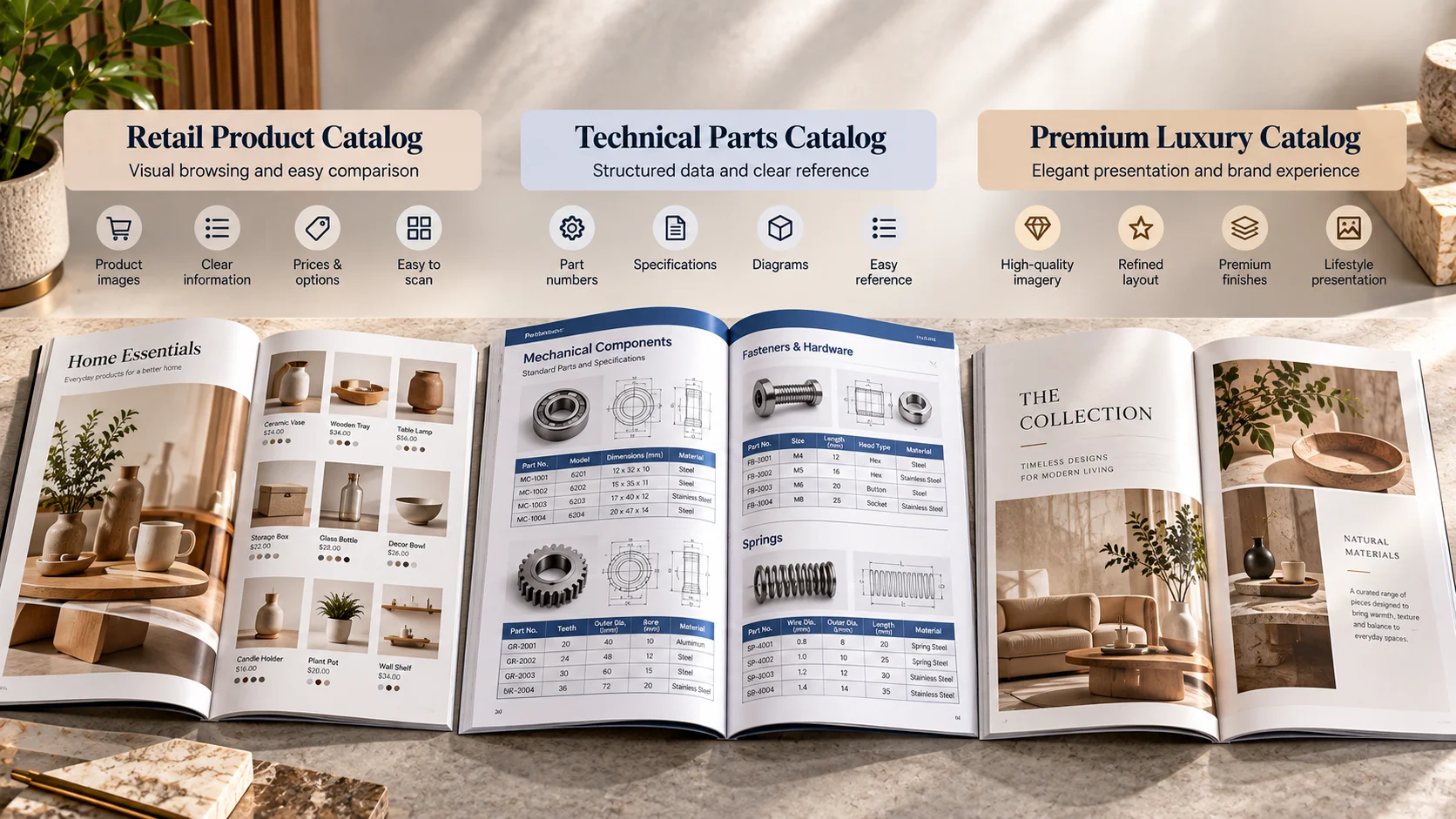
| Retail product catalog | Visual discovery + comparison | Strong product imagery, consistent grids, readable specifications and a portable format. |
| Wholesale catalog | Ordering + SKU clarity | Structured product data, variants, ordering information, durable construction and strong navigation. |
| Technical parts catalog | Reference accuracy | Part numbers, dimensions, compatibility, indexes and a binding that supports repeated consultation. |
| Premium/luxury catalog | Brand experience | Controlled typography, high-quality imagery, considered paper and selective finishing. |
| Seasonal catalog | Speed + version flexibility | Efficient content architecture and production method suited to changing editions. |
| Trade-show catalog | Fast browsing + portability | Strong cover, scannable pages, manageable weight and clear contact/order paths. |
| Service catalog | Clarity + comparison | Organized service categories, scope, inclusions, options and next steps. |
| Test-run catalog | Learning before scale | Use a manageable quantity and proof the design/data before committing to a larger production run. |
When Catalogs Connect With Product Packaging
For product brands, the catalog and the package do different jobs but should not feel disconnected. The catalog may explain the range, compare products and support the sale; the package carries the physical product into the customer’s hands. Keeping photography, product names, colors, product codes and brand language consistent across both can create a more coherent customer experience. A useful starting point is to keep the printed catalog aligned with the same product packaging context language used for the physical product.
This is especially useful when a catalog is used by sales teams, retailers or distributors who need the printed information to match the physical packaging they are presenting. For brands that need coordinated physical packaging, product box options can extend the same product-first presentation beyond the printed catalog.
Frequently Asked Questions About Catalog Printing
What is catalog printing?
Catalog printing is the production of a multi-page printed publication used to present and organize products, services, collections or technical information for browsing and reference.
What is the best catalog size?
The best size depends on the catalog’s content, image proportions, portability, distribution and production requirements. Portrait formats are versatile; landscape can help wide visuals; square can suit image-led premium presentations; custom sizes make sense when the format has a clear purpose.
How many pages should a product catalog have?
There is no universal ideal page count. Start with the actual content, organize it into sections, build a flatplan and then confirm the final page count against the chosen binding and printer’s production range.
Why do catalog page counts often use multiples of four?
Many folded-sheet booklet production systems create four pages from a folded sheet, which is why available page counts often move in multiples of four. The exact counting convention, including how covers are counted, should be confirmed with the printer.
What paper is best for catalog printing?
Choose paper based on the catalog’s imagery, text density, glare tolerance, writing needs, tactile feel, durability and budget. Coated stocks are often useful for photography-heavy catalogs, while uncoated stocks can suit text-heavy or writable reference material.
Should a catalog use matte or gloss paper?
Gloss can emphasize color and photography, while matte or similar lower-reflection surfaces can be more comfortable for reading in some environments. The better choice depends on the content and intended use.
What is the difference between saddle stitch and perfect binding?
Saddle stitching secures folded sheets through the center fold and is suited to thinner publications. Perfect binding gathers pages into a glued square spine and is often considered for thicker catalogs or publications that benefit from a printable spine.
When should I use spiral or coil binding?
Spiral or coil binding is useful when readers need the catalog to stay open, such as reference, training, workbook or counter-use applications. Confirm the available coil style and production range with the printer.
Is digital or offset printing better for catalogs?
Neither is universally better. Digital can be useful for shorter runs or multiple versions, while offset can become more competitive at higher volumes depending on the complete specification. Compare quotes using identical job requirements.
What affects catalog printing cost?
Quantity, page count, size, paper, color coverage, binding, finishing, design/prepress services, version count and shipping can all affect the final price.
What file format should I use for catalog printing?
Use the print-ready file format and PDF settings requested by your printer. Confirm color profile, bleed, image resolution, font handling and other prepress requirements before export rather than assuming one universal preset.
Should I get a proof before printing?
A proof is strongly worth considering when product data, color, finishing, page order or physical appearance matters. For complex or high-value jobs, a physical sample can reveal issues that are difficult to judge from a screen.
Can one catalog design support multiple product versions?
Yes. A controlled template can support multiple versions when the structure is shared and the variable content, such as product names, SKUs, imagery, pricing or seasonal sections, is managed carefully. Version control becomes critical before production.
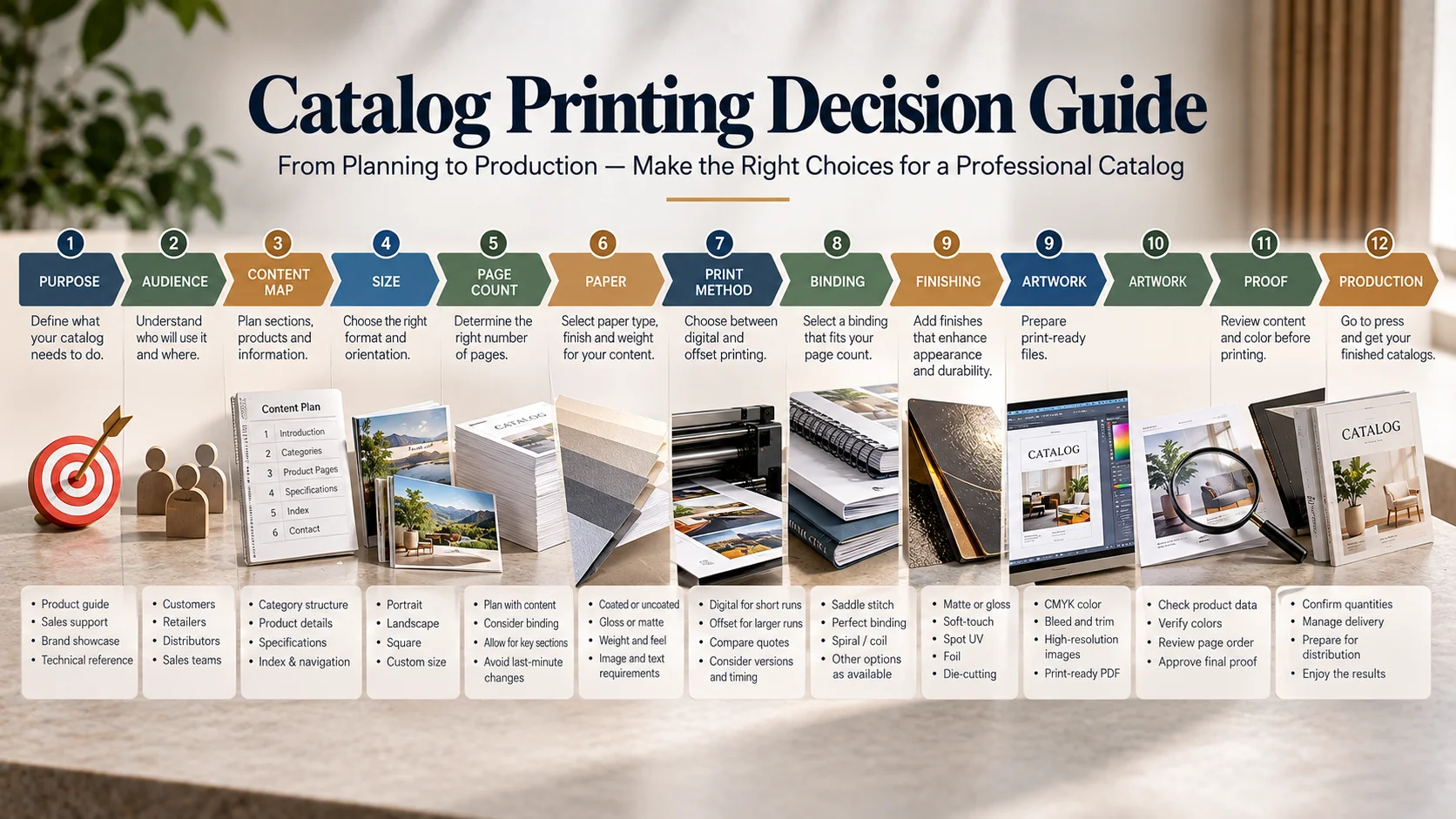
The Catalog Printing Decision Guide
Use this sequence before requesting a final quote or approving artwork:
- PURPOSE — What must the catalog help the reader do?
- AUDIENCE — Who will use it and in what environment?
- CONTENT MAP — What categories, products, specifications and reference pages are required?
- SIZE — Which format makes the content easiest to browse and distribute?
- PAGE COUNT — How many pages does the real content require?
- PAPER — What surface, weight, feel and durability fit the job?
- PRINT METHOD — Which production method makes sense for the quantity and versioning?
- BINDING — Which binding fits the thickness and opening behavior?
- FINISHING — Which finishes add real value?
- ARTWORK — Does the file meet the printer’s current specifications?
- PROOF — Has the final content and physical result been checked?
- PRODUCTION — Is the approved file locked and ready?
- DISTRIBUTION — Have shipping, storage, mailing or sales-use requirements been considered?
That sequence prevents a common problem: optimizing one specification while accidentally making another worse. A lighter paper may reduce mailing weight but change the feel. A thicker stock may improve durability but change binding. A larger format may improve product presentation but affect distribution. The goal is not to maximize every specification; it is to create the right overall publication.
A Practical Next Step for Product Brands
If your catalog is part of a larger product presentation system, the next step is to make sure the printed catalog, physical packaging and product information use the same visual and structural logic. BoxNovo’s custom packaging guide can help when that connection is relevant to the project. For premium product presentations, presentation packaging can also complement a catalog when the physical presentation is part of the customer experience.
For packaging projects, BoxNovo develops custom packaging around product dimensions, structure, artwork, materials, printing and finishing requirements. That same product-first thinking is useful when a catalog needs to represent the physical product accurately. When dimensions need to stay consistent between the catalog and the physical package, use the box sizing guide; when material choices are part of the packaging decision, the material comparison guide provides additional packaging-specific context.