
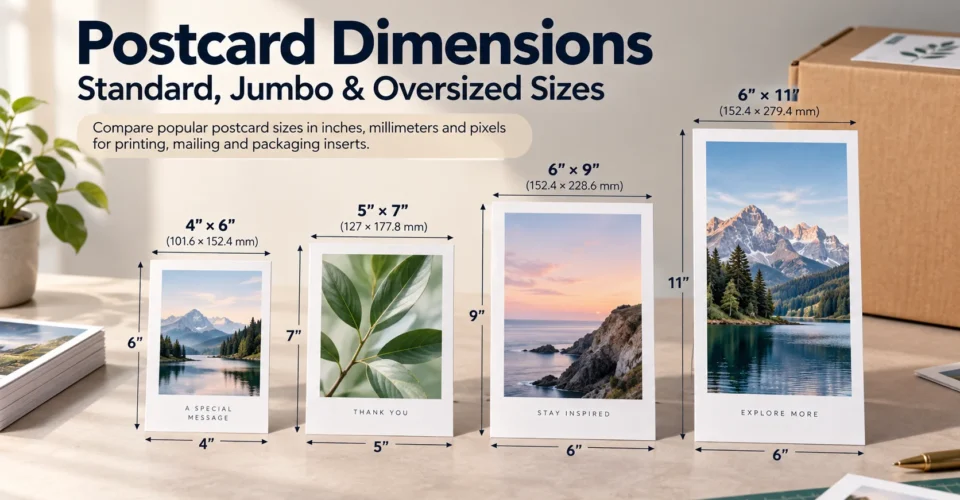
This guide breaks down postcard dimensions in inches, millimeters and pixels, explains common standard, jumbo and oversized formats, and shows how current USPS rules affect mailing. It also covers a use case that is often treated as an afterthought: choosing a postcard-sized insert that actually fits inside a product box.
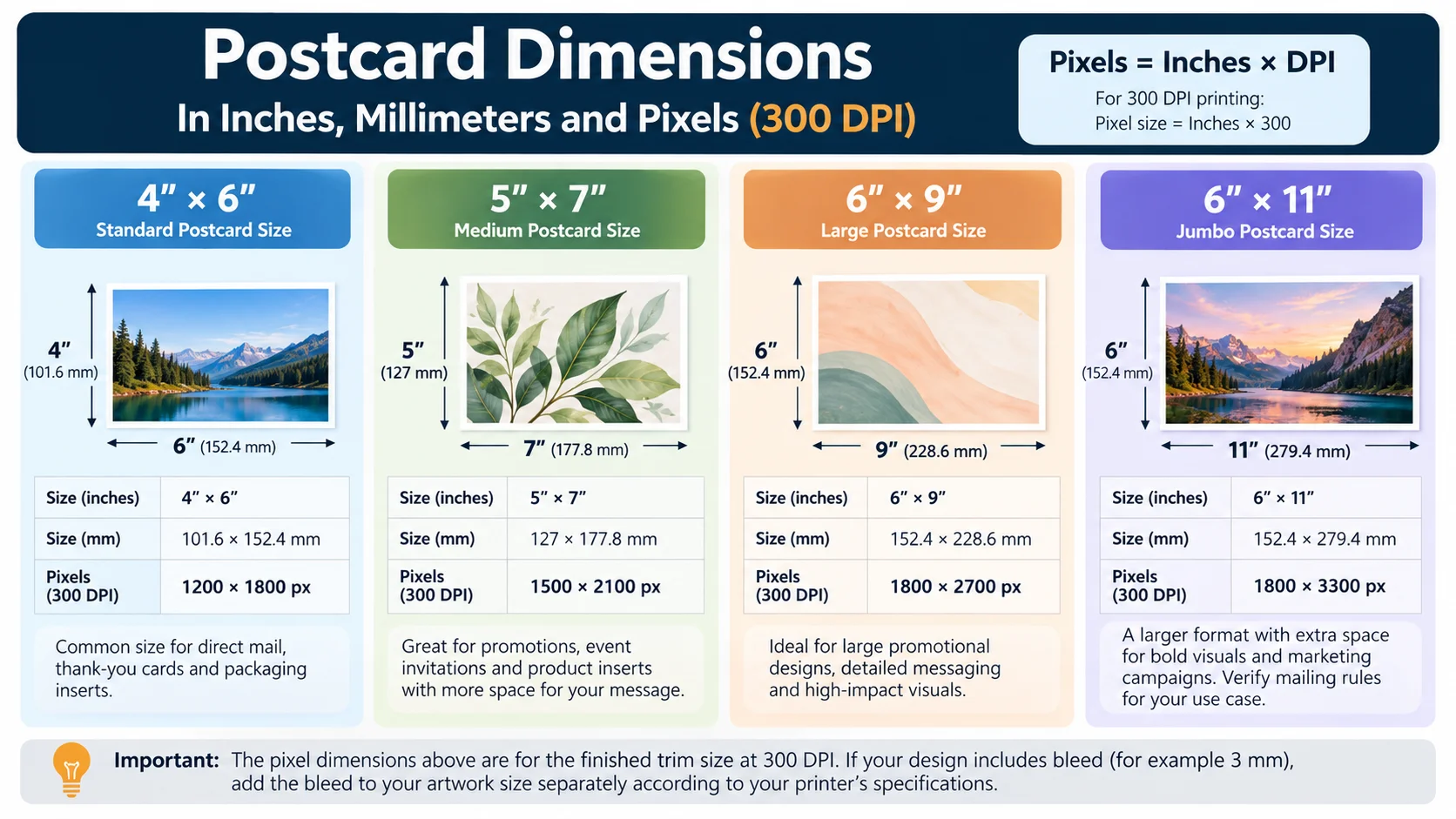
Quick answer: Common postcard formats include 4″ × 6″, 5″ × 7″ and 6″ × 9″. At 300 DPI, those trim sizes are 1200 × 1800, 1500 × 2100 and 1800 × 2700 pixels respectively. For mailing, always check the current USPS requirements for the specific mail class rather than assuming a printer’s “standard” label means postcard-rate eligibility.
Postcard Dimensions at a Glance
| Format | Finished size | Approx. mm | Pixels at 300 DPI | Typical purpose |
|---|---|---|---|---|
| 3.5″ × 5″ | 3.5 × 5 in | 88.9 × 127 mm | 1050 × 1500 | Small direct-mail or compact print format |
| 4″ × 6″ | 4 × 6 in | 101.6 × 152.4 mm | 1200 × 1800 | General postcards, thank-you cards, inserts |
| 4.25″ × 6″ | 4.25 × 6 in | 108 × 152.4 mm | 1275 × 1800 | Mailing-oriented postcard format |
| 5″ × 7″ | 5 × 7 in | 127 × 177.8 mm | 1500 × 2100 | Promotions, photography, richer messaging |
| 6″ × 9″ | 6 × 9 in | 152.4 × 228.6 mm | 1800 × 2700 | Large promotional or direct-mail designs |
| 6″ × 11″ | 6 × 11 in | 152.4 × 279.4 mm | 1800 × 3300 | Large-format promotional pieces; verify mailing class |
| 8.5″ × 11″ | 8.5 × 11 in | 215.9 × 279.4 mm | 2550 × 3300 | Large-format marketing or informational pieces |
| 9″ × 12″ | 9 × 12 in | 228.6 × 304.8 mm | 2700 × 3600 | Oversized print/marketing format; verify mailing rules |
The pixel values above are the finished trim dimensions at 300 DPI. Bleed is added separately according to the printer’s production specification; it should not be confused with the finished postcard size.
What Are Postcard Dimensions?
What does “postcard size” mean?
Postcard dimensions are the physical width and height of the finished card. In U.S. print work, dimensions are commonly written in inches, such as 4″ × 6″ or 5″ × 7″. A printer may also provide the same size in millimeters, while a designer may need the equivalent pixel dimensions for a digital artwork file.
Postcard dimensions vs. finished print size
The finished or trim size is the size of the postcard after cutting. The artwork file can be larger because it may include bleed. For example, a 4″ × 6″ finished card can require artwork extending beyond the trim line. The exact bleed amount is determined by the printer, so use the printer’s template or production specification rather than adding a universal amount without checking.
Inches, millimeters and pixels are different measurements
Inches and millimeters describe physical dimensions. Pixels describe the digital image at a particular resolution. A 4″ × 6″ postcard remains 4″ × 6″ physically whether its artwork is prepared at 150 DPI, 300 DPI or 600 DPI; only the pixel count changes.
Standard Postcard Dimensions
4″ × 6″ postcard dimensions
A 4″ × 6″ postcard is one of the most familiar U.S. postcard formats. It provides enough space for a headline, image, short message and call to action without becoming difficult to handle. At 300 DPI, the trim-size artwork is 1200 × 1800 pixels.
For packaging, 4″ × 6″ is also a practical starting point when the box has enough usable interior space. It can work for thank-you messages, review requests, QR-code cards, care reminders and compact promotional inserts. If you are building a complete packaging system around an insert, explore BoxNovo’s custom packaging solutions to see how the insert fits into the wider packaging experience.
5″ × 7″ postcard dimensions
A 5″ × 7″ postcard provides substantially more surface area for photography, product storytelling, instructions or multiple pieces of information. At 300 DPI, the trim size is 1500 × 2100 pixels.
It can be useful when the card needs to feel more substantial, but the extra size also requires more interior space when used as a packaging insert. For mailed pieces, do not assume that 5″ × 7″ qualifies for the same USPS postcard pricing as a smaller card; the applicable mail class matters.
6″ × 9″ postcard dimensions
A 6″ × 9″ postcard creates a larger canvas for product launches, retail promotions, photography-heavy designs or detailed direct-mail content. At 300 DPI, it is 1800 × 2700 pixels.
For packaging, this size is usually appropriate only when the box has a correspondingly large usable footprint. If the card is intended to sit directly on top of the product, measure the interior before choosing the format.
6″ × 11″ and larger formats
6″ × 11″ is commonly described by printers as a large or jumbo postcard format. At 300 DPI, the trim dimensions are 1800 × 3300 pixels. It provides much more room for messaging, but it should not automatically be treated as a USPS postcard-rate format.
Larger formats such as 8.5″ × 11″ and 9″ × 12″ are better understood as large-format print pieces unless the specific mailing program says otherwise. Their physical size can move them beyond ordinary letter dimensions and into flat-size or another USPS category.
Postcard Dimensions in Pixels
To calculate postcard dimensions in pixels, multiply each physical dimension in inches by the chosen DPI. The formula is:
pixels = inches × DPI
For example, a 5″ × 7″ postcard at 300 DPI is 5 × 300 by 7 × 300, which equals 1500 × 2100 pixels.
| Postcard size | 72 DPI | 150 DPI | 300 DPI | 600 DPI |
|---|---|---|---|---|
| 4″ × 6″ | 288 × 432 | 600 × 900 | 1200 × 1800 | 2400 × 3600 |
| 5″ × 7″ | 360 × 504 | 750 × 1050 | 1500 × 2100 | 3000 × 4200 |
| 6″ × 9″ | 432 × 648 | 900 × 1350 | 1800 × 2700 | 3600 × 5400 |
| 6″ × 11″ | 432 × 792 | 900 × 1650 | 1800 × 3300 | 3600 × 6600 |
| 8.5″ × 11″ | 612 × 792 | 1275 × 1650 | 2550 × 3300 | 5100 × 6600 |
| 9″ × 12″ | 648 × 864 | 1350 × 1800 | 2700 × 3600 | 5400 × 7200 |
For commercial print production, use the printer’s requested resolution and file specifications. A 300 DPI reference is useful for planning, but the correct production setup depends on the printer, artwork and process.
USPS Postcard Dimensions: What Size Can You Mail?
USPS distinguishes between the physical dimensions of a mailpiece and the rate or mail class for which it qualifies. That distinction matters because “postcard” is a common design term, while USPS uses specific physical and eligibility standards.
Retail First-Class Mail postcard dimensions
Current USPS standards list Retail First-Class Mail postcards as rectangular pieces measuring at least 5 inches long and 3.5 inches high, and no more than 6 inches long and 4.25 inches high. Thickness must be between 0.007 and 0.016 inch. Check the current USPS Notice 123 before a live mailing because postal requirements can change.
Commercial First-Class Mail postcard dimensions
Current USPS Commercial First-Class Mail postcard standards allow a larger range: at least 5 inches long and 3.5 inches high, up to 9 inches long and 6 inches high, with thickness from 0.007 to 0.016 inch. This is why a 5″ × 7″ or 6″ × 9″ piece cannot be judged solely by the Retail postcard-size rules.
Why printer “standard” and USPS “postcard” can mean different things
Printers often use “standard” to describe common production sizes. USPS uses specific dimensions, thickness, shape and mail-class requirements. A size can therefore be common in the printing industry without qualifying for every USPS postcard category.
What happens when a postcard is too large?
For Retail First-Class Mail, a piece that exceeds the postcard-size requirements may be subject to letter-size treatment if it meets the applicable letter standards. For Commercial First-Class Mail, the postcard range extends to 9″ × 6″. Beyond that range, the mailpiece may be treated under another classification depending on its exact dimensions, thickness, shape, weight and mail class.
For the most current postcard requirements, use the USPS postcard size reference when preparing an actual mailing.
Letter-size dimensions as a useful reference
USPS currently lists letter-size mail at 5 to 11.5 inches in length, 3.5 to 6.125 inches in height, and 0.007 to 0.25 inch in thickness, subject to the applicable standards. This helps explain why a 6″ × 11″ piece can fall within general letter dimensions while still being outside the Commercial First-Class postcard maximum.
What Are Jumbo Postcard Dimensions?
“Jumbo postcard” is primarily a printing and marketing description rather than a single universal USPS classification. Printers may use the term for large formats such as 6″ × 11″, 8.5″ × 11″ or 9″ × 12″, but the mailing category must be determined from the actual dimensions and the mail class.
Common jumbo formats
- 6″ × 11″ — large horizontal or vertical canvas; at 300 DPI, 1800 × 3300 pixels.
- 8.5″ × 11″ — large document-style format; at 300 DPI, 2550 × 3300 pixels.
- 9″ × 12″ — oversized promotional or informational format; at 300 DPI, 2700 × 3600 pixels.
Jumbo vs. oversized
The words jumbo and oversized are not interchangeable with a USPS rate category. Use them as descriptive printing terms, then verify the actual postal classification before production if the piece will be mailed.
When a large format makes sense
- A product launch needs more room for photography and feature callouts.
- A promotion needs a large visual with a clear offer and QR code.
- An informational piece needs several sections without reducing type size excessively.
- A handout or packaging insert has a large enough usable area to support the format.
Oversized Postcard Dimensions
Oversized postcard dimensions are best treated as a design category rather than a single fixed measurement. Once a piece moves beyond common postcard formats, mailing requirements become more important because USPS may classify it as a letter, flat or another mailpiece type.
Examples of oversized formats
| Format | 300 DPI trim pixels | Planning note |
|---|---|---|
| 6″ × 11″ | 1800 × 3300 | Large format; verify mail class |
| 8.5″ × 11″ | 2550 × 3300 | Exceeds letter height; verify flat/mail program |
| 9″ × 12″ | 2700 × 3600 | Large format; verify exact USPS category |
If the goal is direct mail, decide the intended USPS mail class before finalizing an oversized design. If the goal is packaging, postal rules may be irrelevant and the more important question becomes whether the insert fits the box and can be removed without damaging the product.
Postcard Dimensions for Packaging Inserts
A postcard can serve as a thank-you card, product-information sheet, care card, promotional insert, review request or QR-code touchpoint inside an order. For these applications, the “right” postcard dimensions are determined by the packaging system rather than by mailing alone.
Thank-you cards
A compact 4″ × 6″ format is often a practical starting point when the message is short and the card needs to sit neatly inside a shipping box. The final choice should be based on the box’s usable interior footprint.
Product information and care cards
If the card needs multiple steps, icons, care instructions, product details or multilingual copy, a 5″ × 7″ format can provide more breathing room. The extra surface area should be justified by the information being communicated.
Review, referral and promotional inserts
Cards that ask for one action—such as scanning a QR code, leaving a review or using a discount—usually benefit from a focused layout. A larger card is not automatically more effective; it should provide enough room for the message without creating unnecessary bulk.
Measure the box before choosing the insert
The usable insert area is not always equal to the outside dimensions of the box. Account for the product, protective material, interior walls, lid clearance and how the insert will be placed.
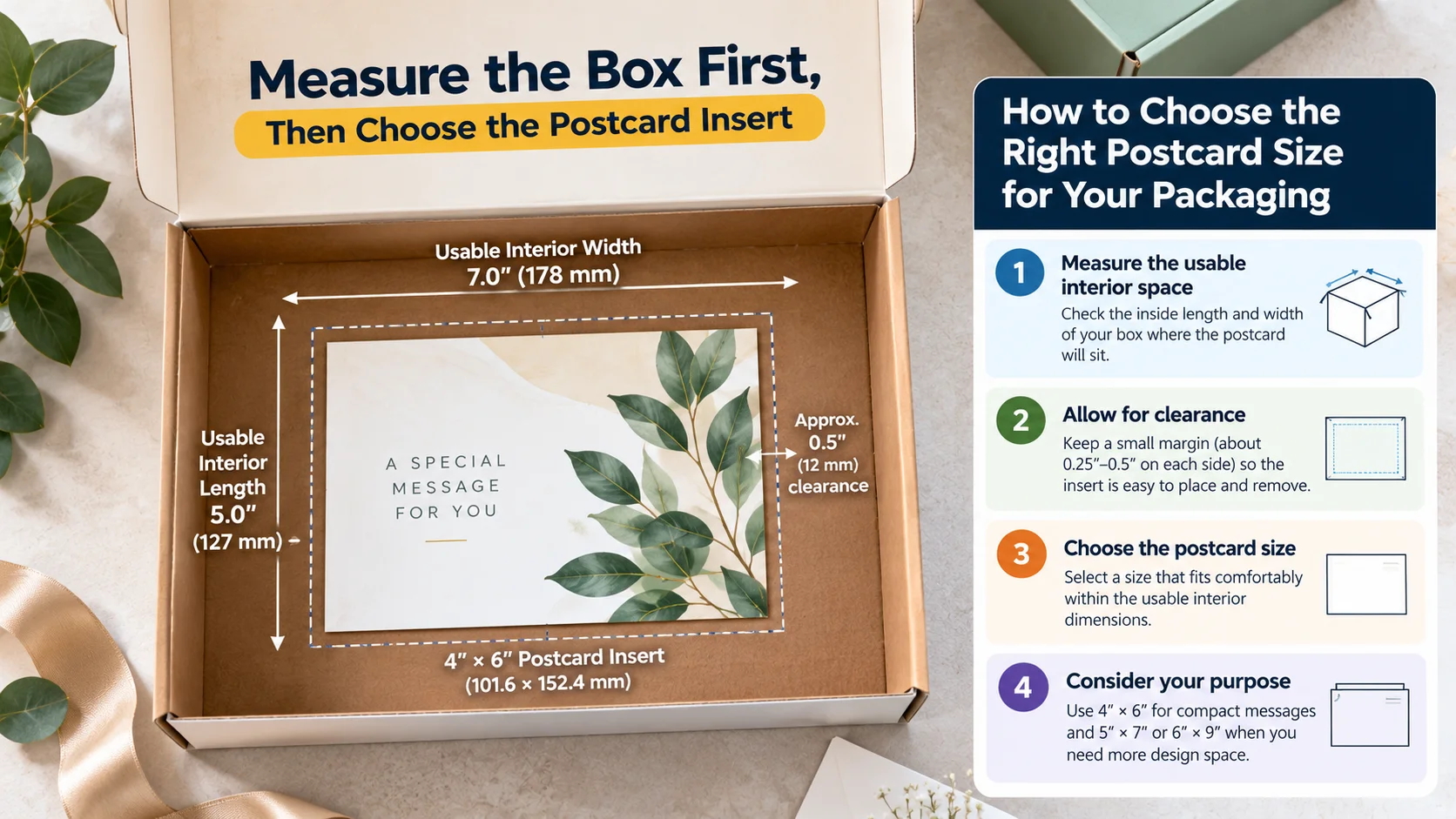
- Measure the usable length and width of the box interior where the card will sit.
- Decide whether the card will sit on top of the product, beside it or underneath another insert.
- Leave practical clearance so the card can be removed without being wedged tightly into the box.
- Check whether the card must coexist with tissue, crinkle fill, product documentation or other packaging components.
- Choose the smallest format that comfortably accommodates the required content and brand presentation.
If the insert size is driving the packaging design, BoxNovo’s made-to-fit box sizing options can help you think about the box and insert as one coordinated system.
Postcard insert vs. custom printed packaging
A postcard insert is useful when the information needs to be removable or updated independently from the box. If the message is part of the permanent product presentation, printing directly on the packaging may reduce the number of loose pieces inside the order.
For ecommerce orders, a branded mailer box for shipping can provide the outer packaging structure while the insert carries the removable message.
For retail presentation, consider how the insert works alongside made-to-fit product packaging so the card, product and printed box feel like one system.
For premium packaging where the insert has a defined position, rigid presentation packaging with an integrated insert can integrate the insert into the presentation rather than leaving it loose.
When the packaging needs to be planned as a complete system, see BoxNovo’s complete packaging planning guide for the broader relationship between box structure, materials, printing and presentation.
How to Choose the Right Postcard Size
Start with the job the postcard must perform, then work backward to the physical size. Use this decision sequence:
- Define the purpose: mailing, handout, thank-you message, product information, promotion, review request or another use.
- Decide how much content the card actually needs. One clear message may need far less space than a multi-step instruction card.
- Determine whether mailing requirements apply. If yes, identify the intended USPS mail class before locking the dimensions.
- Measure the available packaging space if the card will be an insert.
- Choose the physical size and orientation.
- Set the digital artwork dimensions from the trim size and required DPI.
- Add bleed and establish a safe area according to the printer’s specification.
- Check the final proof at actual size before ordering the full run.
Postcard Design Dimensions: Bleed, Trim & Safe Area
Trim size
Trim size is the final physical dimension of the finished card. If the finished postcard is 5″ × 7″, the trim size is 5″ × 7″.
Bleed
Bleed is extra artwork extending beyond the trim line so backgrounds and images can reach the edge after cutting. The required bleed varies by printer and production method. Use the printer’s supplied template when available.
Safe area
The safe area is the interior region where important text, logos and QR codes should remain. Keeping critical elements away from the trim reduces the risk of an important element appearing too close to an edge after cutting.
Address and postage areas for mailed postcards
A mailed postcard needs space for the address, postage or indicia and any applicable postal markings. The exact preparation rules depend on the mail class and mailing method. Do not treat the back of the postcard like an unrestricted advertising canvas if the piece will enter the mail stream.
Postcard Dimensions by DPI: 72, 150, 300 & 600
DPI changes the number of pixels in the digital file, not the physical size of the printed postcard. For example, 4″ × 6″ is 288 × 432 pixels at 72 DPI, 600 × 900 at 150 DPI, 1200 × 1800 at 300 DPI and 2400 × 3600 at 600 DPI.
For print production, follow the printer’s required resolution and file setup. Do not upscale a low-resolution image at the last minute and expect additional pixels to create genuine detail that was not present in the original artwork.
Postcard Size Comparison: What Each Format Is Good For
| Size | Design space | Mailing consideration | Packaging consideration | Good fit for |
|---|---|---|---|---|
| 4″ × 6″ | Compact | Within Retail postcard size range if all applicable requirements are met | Easy starting point for compact inserts | Thank-you cards, QR cards, short promotions |
| 5″ × 7″ | Moderate | Outside Retail postcard maximum; may fit Commercial First-Class postcard dimensions | Needs more interior space | Product stories, photography, promotions |
| 6″ × 9″ | Large | Within Commercial First-Class postcard dimensions if other requirements are met | Usually needs a larger box footprint | Large promotions, product launches |
| 6″ × 11″ | Very large | Outside Commercial First-Class postcard maximum; verify classification | Often too large for compact boxes | Large-format marketing or handouts |
| 8.5″ × 11″ | Very large | Beyond letter height; verify applicable mail program | Generally unsuitable for small product boxes | Informational or large-format campaigns |
| 9″ × 12″ | Oversized | Verify exact USPS category and mail class | Usually requires substantial packaging space | Large promotional or informational pieces |
USPS classification is not determined by size alone. Shape, thickness, weight, preparation and mail class can affect eligibility. Use the table as a planning reference, not as a substitute for checking the current USPS requirements for a specific mailing.
Common Postcard Dimension Mistakes
1. Confusing trim size with pixel dimensions
A 6″ × 9″ postcard is a physical size. 1800 × 2700 pixels is the equivalent at 300 DPI. They are related, but they are not the same measurement.
2. Designing before deciding how the card will be used
A mailed postcard, handout and packaging insert can have very different constraints. Decide the distribution method before finalizing the size.
3. Assuming every “standard” size gets postcard-rate postage
Printer terminology and USPS classifications are different systems. Check the applicable USPS mail class and current standards.
4. Forgetting the packaging footprint
A card that looks reasonable on screen can be awkward inside a box. Measure the usable interior area, not just the outside dimensions.
5. Ignoring bleed and safe area
Artwork should be prepared for the cutting process. Use the printer’s bleed specification and keep critical content safely inside the trim.
6. Making the card larger just because more space is available
Extra space should improve hierarchy, readability or information density. It should not simply create a larger empty canvas.
7. Treating “jumbo” as a postal classification
Jumbo is commonly used as a descriptive printing term. USPS classification depends on the actual piece and mailing program.
Frequently Asked Questions About Postcard Dimensions
What are standard postcard dimensions?
Common U.S. postcard formats include 4″ × 6″, 5″ × 7″ and 6″ × 9″. “Standard” is a printing term, so confirm USPS requirements separately if the card will be mailed.
What is the standard postcard size in inches?
4″ × 6″ is one of the most widely used U.S. postcard formats. It is also within the current Retail First-Class postcard size range when the other applicable USPS requirements are met.
What are postcard dimensions in pixels?
At 300 DPI, 4″ × 6″ is 1200 × 1800 pixels, 5″ × 7″ is 1500 × 2100 pixels, and 6″ × 9″ is 1800 × 2700 pixels.
What are USPS postcard dimensions?
Current Retail First-Class postcard dimensions are 5″–6″ long and 3.5″–4.25″ high, with 0.007″–0.016″ thickness. Commercial First-Class postcards can be up to 9″ long and 6″ high, with the same thickness range.
What is the largest Retail First-Class postcard size?
The current Retail First-Class maximum is 6″ long by 4.25″ high, with a maximum thickness of 0.016″.
What is the largest Commercial First-Class postcard size?
The current Commercial First-Class maximum is 9″ long by 6″ high, with a maximum thickness of 0.016″.
What are jumbo postcard dimensions?
There is no single universal jumbo dimension. Printers may use “jumbo” for large formats such as 6″ × 11″, 8.5″ × 11″ or 9″ × 12″. Verify the USPS category separately if mailing.
What are oversized postcard dimensions?
Oversized is a descriptive term rather than one fixed size. Once a piece exceeds common postcard dimensions, its USPS classification depends on its exact size, thickness, shape, weight and mail class.
Is 5″ × 7″ a postcard?
Yes, it is commonly sold and used as a postcard format. However, it does not fit within the current Retail First-Class postcard maximum; it can fall within the Commercial First-Class postcard dimensions if all applicable requirements are met.
Is 6″ × 9″ a postcard?
It is commonly used as a postcard format and fits within the current Commercial First-Class postcard dimensional range, assuming the other USPS requirements for the mailing apply.
Is 6″ × 11″ a USPS postcard?
Not under the current Commercial First-Class postcard dimensional maximum, which is 9″ long. A 6″ × 11″ piece may instead fall under another mailpiece classification depending on the mailing program and its other characteristics.
What size postcard fits inside a product box?
There is no universal insert size. Measure the usable interior footprint and choose a card that leaves practical clearance around the product and other packing materials.
What size should a thank-you card be for packaging?
4″ × 6″ is a practical starting point for many compact thank-you inserts, but the correct size depends on the box interior and the amount of content.
How many pixels is a 4″ × 6″ postcard at 300 DPI?
1200 × 1800 pixels for the trim size.
How many pixels is a 5″ × 7″ postcard at 300 DPI?
1500 × 2100 pixels for the trim size.
How much bleed should a postcard have?
Bleed is printer-specific. Use the exact bleed requirement supplied by the printer or print template rather than assuming one universal value.
What is the difference between trim and bleed?
Trim is the final cut size. Bleed is extra artwork extending beyond the trim so edge-to-edge artwork remains covered after cutting.
What DPI should postcard artwork use?
Use the printer’s required production specification. 300 DPI is a common planning reference for raster artwork, but the correct file setup depends on the production process and printer.
A Practical Postcard Dimension Checklist
- Confirm the finished trim size in inches.
- Convert the trim size to pixels using the required DPI.
- Confirm the printer’s bleed and safe-area specifications.
- If mailing, identify the intended USPS mail class before finalizing the design.
- Check thickness and shape requirements for the intended mailing method.
- Reserve address, postage/indicia and other postal areas when applicable.
- If used as a packaging insert, measure the usable interior of the box.
- Check that the insert does not interfere with the product, protective materials or lid closure.
- Review the final artwork at actual size before ordering.
Make Postcard Size Part of the Packaging Plan
A postcard insert works best when its dimensions support the entire customer experience. The card should fit naturally inside the box, remain easy to remove, provide enough space for its message and visually belong with the rest of the packaging.
If you are still deciding how the box should accommodate the insert, review BoxNovo’s made-to-fit box sizing options before finalizing the card dimensions.
For ecommerce brands, the same principle applies to the outer shipping experience: the box, product, insert and printed message should work together rather than being designed as isolated pieces. Explore branded shipping mailers when the insert is part of a branded ecommerce unboxing experience.
The right postcard dimensions are ultimately the ones that match the card’s job. Start with the purpose, confirm the physical constraints, translate the final size into production pixels, and verify any mailing requirements before the design is locked.