
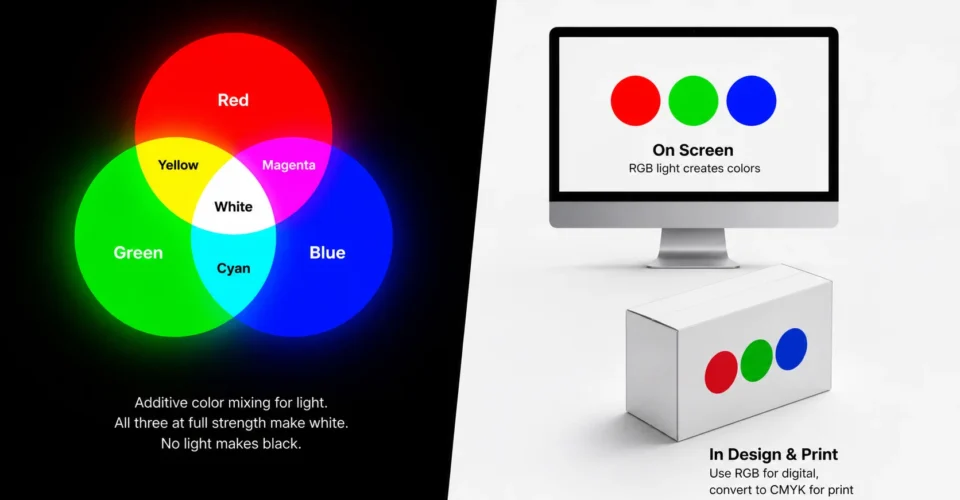
RGB stands for red, green and blue, the three colors of light that screens mix to create every color you see on a phone, monitor or TV. It’s an additive color model: each pixel adds red, green and blue light together, and full intensity of all three makes white. With 256 levels per channel, standard 24-bit RGB can describe 16,777,216 colors.
RGB is perfect for anything people see on a screen, but printers use ink, not light. That’s why a bright RGB design can look duller on a printed box or label. This guide explains how RGB works, what RGB values and HEX codes mean, and how sRGB and other RGB color spaces differ from each other. It also shows how to convert RGB to CMYK for packaging and print without losing your brand colors. Use the color mixer below to try it yourself.
Key takeaways
-
- RGB means red, green and blue: the additive color model every screen uses.
- Each channel runs from 0 to 255, so 24-bit RGB describes 16,777,216 colors, often written as HEX codes like #FF0000.
- sRGB is the standard RGB color space for the web; Adobe RGB and Display P3 cover wider ranges.
- Printing uses CMYK ink, so bright RGB colors can look duller on packaging unless you convert and proof them.
- For exact brand colors in print, keep HEX, CMYK and a Pantone reference for each color.
In this guide
-
- What Does RGB Stand For? A Quick Answer
- How the RGB Color Model Works
- RGB Values Explained
- RGB Color Codes Chart
- How to Find the RGB Value of Any Color
- RGB Color Spaces: sRGB, Adobe RGB and Display P3
- RGB vs CMYK: Light vs Ink
- Why RGB Colors Change When You Print Packaging
- How to Convert RGB to CMYK for Print
- When to Use RGB, and When Not To
- Keep Brand Colors Consistent on Screen and Packaging
- RGB Lighting: Keyboards, LEDs and Gaming PCs
- A Short History of RGB
- Common RGB Mistakes
- Frequently Asked Questions About RGB
- Use RGB for Screens and Plan Print Color Early
What Does RGB Stand For? A Quick Answer
| Question | Answer |
|---|---|
| What RGB stands for | Red, green, blue |
| Type of color model | Additive (mixes light) |
| Where it’s used | Screens, cameras, scanners, web, apps, video |
| Value range per channel | 0 to 255 (8-bit), also written as 0–100% or 0.0–1.0 |
| Number of colors (24-bit) | 256 × 256 × 256 = 16,777,216 |
| White and black | White is rgb(255, 255, 255); black is rgb(0, 0, 0) |
| Opposite model | CMYK, the subtractive model used for printing with ink |
How the RGB Color Model Works
Additive Color Mixing
RGB is additive because light adds together. Start with a black screen, which has no light, and turn up red, green and blue in different amounts to build every other color. When two primaries mix at equal, full intensity, they make the secondary colors:
| Light mixed | Result |
|---|---|
| Red + green | Yellow |
| Green + blue | Cyan |
| Blue + red | Magenta |
| Red + green + blue | White |
| No light at all | Black |
Those secondary colors, cyan, magenta and yellow, are the primary inks of printing. That’s no coincidence: RGB and CMYK are two sides of the same color system, one adding light and the other subtracting it.

Why Red, Green and Blue?
Human eyes have three types of color-sensitive cone cells, broadly most sensitive to long (reddish), medium (greenish) and short (bluish) wavelengths. This three-part, or trichromatic, vision was described by Thomas Young and Hermann von Helmholtz in the 1800s (Wikipedia). By controlling just three colors of light, a screen can trigger the same response in your eyes as a much wider range of real-world colors.
Pixels and Subpixels
A screen image is made of tiny pixels, and each pixel has three subpixels: one red, one green and one blue. The display changes the brightness of each subpixel. From normal viewing distance, your eye blends them into a single color.
RGB Values Explained
The 0 to 255 Scale
In most software, each RGB channel is stored in 8 bits, which gives 256 possible levels, from 0 (off) to 255 (full intensity). Three channels at 8 bits each make 24-bit color: 256 × 256 × 256 = 16,777,216 possible colors. Some RGB examples:
| Color | RGB value | HEX code |
|---|---|---|
| Red | rgb(255, 0, 0) | #FF0000 |
| Green | rgb(0, 255, 0) | #00FF00 |
| Blue | rgb(0, 0, 255) | #0000FF |
| Yellow | rgb(255, 255, 0) | #FFFF00 |
| Cyan | rgb(0, 255, 255) | #00FFFF |
| Magenta | rgb(255, 0, 255) | #FF00FF |
| White | rgb(255, 255, 255) | #FFFFFF |
| Black | rgb(0, 0, 0) | #000000 |
| Mid gray | rgb(128, 128, 128) | #808080 |
HEX Codes
A HEX code is the same RGB value written in hexadecimal, the base-16 number system used in web design. #RRGGBB has two digits each for red, green and blue, from 00 (0) to FF (255). For example, #FF8000 means red 255, green 128 and blue 0, a bright orange. CSS also accepts the same color as rgb(255 128 0) (MDN).
Other Ways to Write RGB
-
- Percentages: rgb(100%, 50%, 0%) is the same orange.
- Decimals from 0 to 1: common in code and 3D software, for example (1.0, 0.5, 0.0).
- HSL: hue, saturation and lightness describe the same RGB colors in a more intuitive way for designers.
Bit Depth: 8-Bit vs 16-Bit
Standard images use 8 bits per channel. Photo editing and professional workflows often use 16 bits per channel, or 48-bit color. The extra levels reduce banding when you make big edits to gradients, skies and shadows.
Why rgb(128, 128, 128) Isn’t Half as Bright
RGB numbers aren’t a straight measure of light. Standard sRGB values are gamma-encoded to match how our eyes see brightness, so we notice more steps in dark tones. As a result, mid gray, rgb(128, 128, 128), emits only about 22% of the light of white, even though 128 is about half of 255 (Wikipedia). This is why blending, resizing and gradients can look different in different software.
RGB vs RGBA: Adding Transparency
RGBA adds a fourth value, alpha, for transparency. Alpha runs from 0 (fully transparent) to 1 (fully opaque), so rgba(255, 0, 0, 0.5) is red at 50% opacity. Modern CSS also accepts a slash, as in rgb(255 0 0 / 50%), and an eight-digit HEX code such as #FF000080. Transparency only works on screens and in layered files; printers flatten it before printing.
To see how these values relate, mix your own color below. The tool shows the HEX code, a simple CMYK estimate, text contrast and whether the color may shift in print.
RGB Color Codes Chart
Here are common colors with their RGB values, HEX codes and a simple CMYK estimate from the textbook formula. Color names and values follow the standard CSS named colors. Real print values depend on your printer’s profile, so use the CMYK column only as a starting point.
| Color | HEX | RGB | Simple CMYK estimate |
|---|---|---|---|
| Red | #FF0000 | rgb(255, 0, 0) | C 0 M 100 Y 100 K 0 |
| Orange | #FFA500 | rgb(255, 165, 0) | C 0 M 35 Y 100 K 0 |
| Gold | #FFD700 | rgb(255, 215, 0) | C 0 M 16 Y 100 K 0 |
| Yellow | #FFFF00 | rgb(255, 255, 0) | C 0 M 0 Y 100 K 0 |
| Lime (pure green) | #00FF00 | rgb(0, 255, 0) | C 100 M 0 Y 100 K 0 |
| Green | #008000 | rgb(0, 128, 0) | C 100 M 0 Y 100 K 50 |
| Olive | #808000 | rgb(128, 128, 0) | C 0 M 0 Y 100 K 50 |
| Teal | #008080 | rgb(0, 128, 128) | C 100 M 0 Y 0 K 50 |
| Cyan | #00FFFF | rgb(0, 255, 255) | C 100 M 0 Y 0 K 0 |
| Sky blue | #87CEEB | rgb(135, 206, 235) | C 43 M 12 Y 0 K 8 |
| Blue | #0000FF | rgb(0, 0, 255) | C 100 M 100 Y 0 K 0 |
| Navy | #000080 | rgb(0, 0, 128) | C 100 M 100 Y 0 K 50 |
| Purple | #800080 | rgb(128, 0, 128) | C 0 M 100 Y 0 K 50 |
| Magenta | #FF00FF | rgb(255, 0, 255) | C 0 M 100 Y 0 K 0 |
| Pink | #FFC0CB | rgb(255, 192, 203) | C 0 M 25 Y 20 K 0 |
| Brown | #A52A2A | rgb(165, 42, 42) | C 0 M 75 Y 75 K 35 |
| Maroon | #800000 | rgb(128, 0, 0) | C 0 M 100 Y 100 K 50 |
| Silver | #C0C0C0 | rgb(192, 192, 192) | C 0 M 0 Y 0 K 25 |
| Gray | #808080 | rgb(128, 128, 128) | C 0 M 0 Y 0 K 50 |
| White | #FFFFFF | rgb(255, 255, 255) | C 0 M 0 Y 0 K 0 |
| Black | #000000 | rgb(0, 0, 0) | C 0 M 0 Y 0 K 100 |
How to Find the RGB Value of Any Color
-
- Photoshop or Illustrator: pick the Eyedropper tool, click the color, then open the color picker or Info panel to read the RGB and HEX values.
- Canva: select an element and open its color panel; the HEX code appears next to the swatch.
- Web browsers: in Chrome or Edge DevTools, click any color square in the Styles panel to open a color picker with an eyedropper.
- Windows: Microsoft PowerToys includes a Color Picker you open with Windows key + Shift + C.
- macOS: the built-in Digital Color Meter app, in Applications > Utilities, shows the RGB value under the cursor.
- Printed packaging or a product: a phone photo can’t give you an accurate value, because lighting and the camera change the color. Match printed colors with a Pantone guide or ask your printer to measure them with a spectrophotometer.
RGB Color Spaces: sRGB, Adobe RGB and Display P3
RGB on its own is device-dependent: the same numbers can look different on two screens because each screen’s red, green and blue are slightly different. A color space fixes that by defining exactly which red, green and blue the numbers refer to, plus the white point.
| Color space | Created | Gamut | Typical use |
|---|---|---|---|
| sRGB | Proposed by HP and Microsoft in 1996; later standardized as IEC 61966-2-1 | Standard | The web, most apps, social media, everyday photos |
| Adobe RGB (1998) | Adobe, 1998 | Wider, especially in greens and cyans | Professional photography and print prepress |
| Display P3 | Apple, based on the DCI-P3 cinema primaries | Wider than sRGB, especially in reds and greens | Modern phones, laptops and wide-gamut displays |
| Rec. 2020 | ITU, for ultra-high-definition video | Very wide | UHD and HDR video |
sRGB uses the D65 white point (daylight) and was designed around typical displays of the time (W3C). If you’re preparing images for the web or e-commerce, sRGB is still the safest choice, because almost every browser and device assumes it.
RGB vs CMYK: Light vs Ink
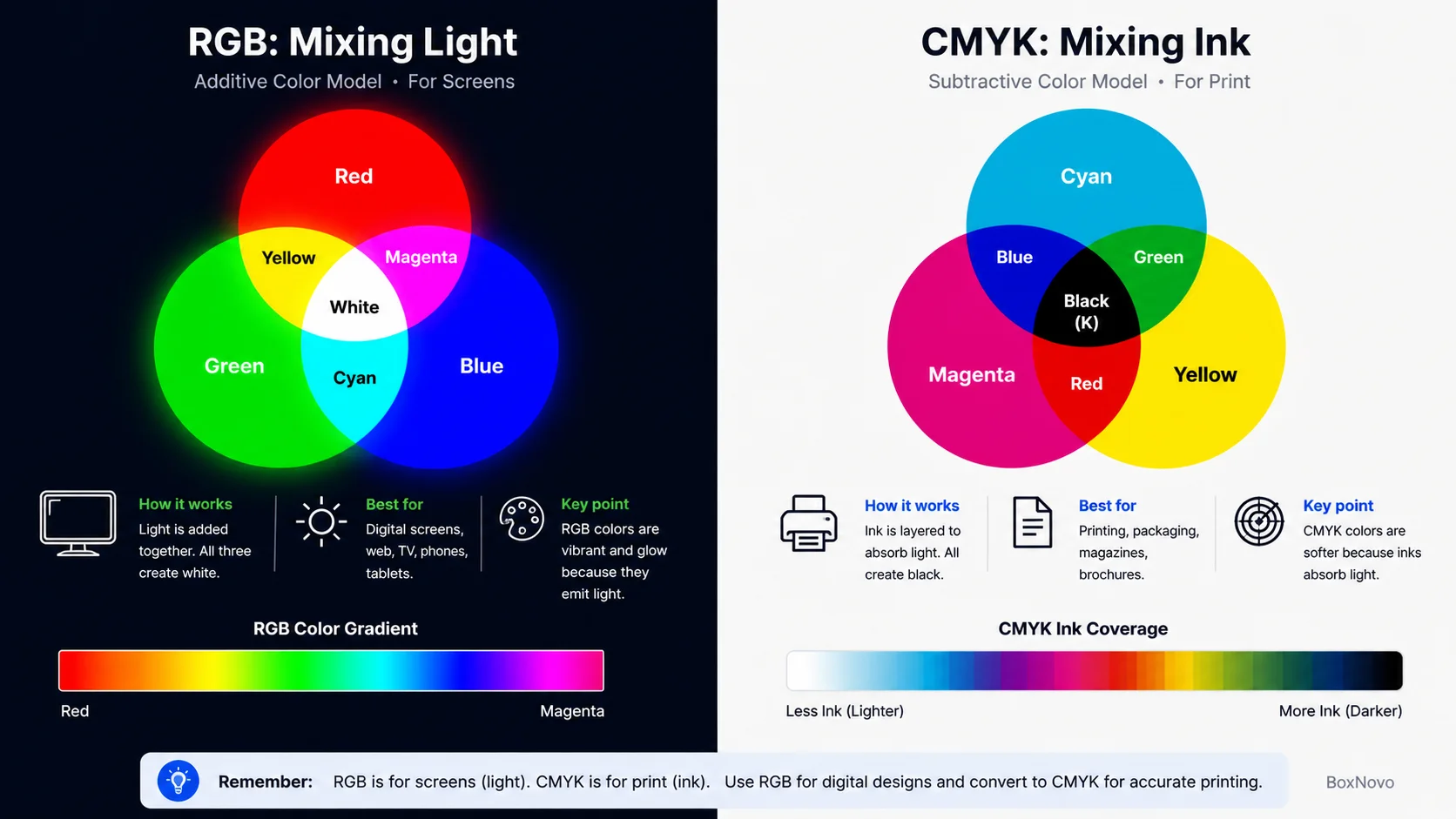
CMYK stands for cyan, magenta, yellow and key (black). It’s subtractive: inks absorb, or subtract, parts of the white light reflected from paper or board. More ink makes a darker color, which is the opposite of RGB.
| Feature | RGB | CMYK |
|---|---|---|
| Works with | Light from a screen | Ink on paper, board or film |
| Color mixing | Additive: more light is brighter | Subtractive: more ink is darker |
| Primaries | Red, green, blue | Cyan, magenta, yellow, plus black (key) |
| White comes from | All three at full intensity | The unprinted paper or board |
| Black comes from | No light | Black ink, often with other inks for a richer black |
| Best for | Websites, apps, social media, video, digital ads | Packaging, labels, brochures, books, business cards |
| Common file setup | sRGB for web; Adobe RGB for some photo work | The printer’s CMYK profile, plus spot colors where needed |
You’ll sometimes read that CMYK can only show “16,000 colors.” That isn’t how it works. The range of printable colors, called the gamut, depends on the inks, the paper or board and the press. It’s smaller than a screen’s gamut in some areas, especially very bright blues, greens and oranges, and it can’t reproduce neon or fluorescent colors at all. In other areas, such as some cyans and yellows, print can reach colors that sRGB can’t.
RGB, HEX, HSL, CMYK and Pantone Compared
| Color code | What it is | Example | Use it for |
|---|---|---|---|
| RGB | Amounts of red, green and blue light | rgb(0, 128, 128) | Screens, design software, CSS |
| HEX | The same RGB value in hexadecimal | #008080 | Websites, brand guides, Canva |
| HSL | Hue, saturation and lightness of an RGB color | hsl(180, 100%, 25%) | Adjusting colors in CSS and design tools |
| CMYK | Percentages of cyan, magenta, yellow and black ink | Depends on the print profile | Process printing on packaging, labels and paper |
| Pantone (spot) | A named, premixed ink color from a guide | A Pantone number chosen from a printed guide | Exact brand colors in print |
Why RGB Colors Change When You Print Packaging
If you send an RGB file to print, the printer, or the printer’s software, converts it to CMYK. Several things then change how the color looks:
-
- Out-of-gamut colors: bright RGB colors outside the CMYK gamut are pulled to the nearest printable color, so they look duller.
- The material: coated white board prints brighter and sharper than uncoated stock. Colors printed on brown board come out darker; see our notes on printing on kraft before choosing it for a colorful design.
- The print profile: printers use standard CMYK profiles, such as GRACoL in North America or FOGRA in Europe, for a given press and paper.
- Finishes: gloss lamination makes colors look deeper; matte and soft-touch finishes soften them.
- Lighting: packaging is judged under shop and daylight, not under a screen’s backlight. Print shops view proofs under standardized D50 lighting.
For brand colors that must match every time, printers use spot colors: premixed inks from systems such as Pantone. Some presses also use extended-gamut printing, CMYK plus orange, green and violet, to reach brighter colors without spot inks.
How to Convert RGB to CMYK for Print
Follow these steps to keep your colors as close as possible when moving from screen to print:
-
- Ask your printer for their CMYK profile and file requirements before you convert.
- Keep an RGB master file. Convert a copy, so you can still use the original for web and social.
- Convert in your design software. In Photoshop, use Edit > Convert to Profile and choose the printer’s CMYK profile. In Illustrator, use File > Document Color Mode > CMYK Color. In InDesign, export a print PDF that converts colors to the printer’s destination profile.
- Soft-proof on screen. In Photoshop, use View > Proof Setup and Proof Colors to preview the print result, and View > Gamut Warning to highlight colors that can’t print.
- Fix problem colors by adjusting them inside the CMYK range, or by specifying a spot color.
- Set up the rest of the artwork at full size with bleed. Our guide to bleed and trim setup shows how.
- Order a printed proof on the actual material, because screens can never show print color perfectly.
Designing in Canva? Some Canva plans let you download a PDF Print file in CMYK. Our guide to Canva print settings walks through the export step by step.
The Simple RGB to CMYK Formula
You may see this textbook formula, with R, G and B as values from 0 to 1:
-
- K = 1 − the largest of R, G and B
- C = (1 − R − K) ÷ (1 − K)
- M = (1 − G − K) ÷ (1 − K)
- Y = (1 − B − K) ÷ (1 − K)
It’s useful for quick estimates, and our color code converter works the same way. Real print conversion uses ICC color profiles, which account for the press, inks and paper, so always use your printer’s profile for production files.
Example: teal, rgb(0, 128, 128) or #008080. The formula gives K = 1 − 0.50 = 50%, then C = 100%, M = 0% and Y = 0%. A printer’s profile will return different numbers, because real inks aren’t perfect and the profile adds some of every ink to build a richer color. That difference is exactly why you should convert with the profile and check a proof rather than typing formula values into your artwork.
How to Check Whether a File Is RGB or CMYK
-
- Photoshop: Image > Mode shows a check mark next to RGB Color or CMYK Color.
- Illustrator: File > Document Color Mode shows which mode is selected.
- InDesign: Window > Output > Separations Preview shows which inks are used.
- Acrobat Pro: the Output Preview tool shows the color spaces used in a PDF.
When to Use RGB, and When Not To
| Project | Use | Why |
|---|---|---|
| Websites, apps and email | RGB (sRGB) | Screens display RGB, and sRGB is the web default |
| Social media and digital ads | RGB (sRGB) | Platforms expect sRGB images |
| Video and presentations | RGB | Displays and projectors use RGB |
| Product photos for online stores | RGB (sRGB) | Consistent color across browsers |
| Printed packaging and labels | CMYK, plus spot colors if needed | Presses print with ink |
| Brochures, books and catalogs | CMYK | Commercial printing uses CMYK |
| Home or office printing | RGB is usually fine | The printer driver converts to its own inks |
Wondering whether a design needs to be CMYK? If it will be printed by a commercial printer, such as printed product boxes, printed booklets and catalogs or invitation print files, set it up for CMYK.
Keep Brand Colors Consistent on Screen and Packaging
Your logo might appear on a website, an Instagram post and a shipping box on the same day. A simple color specification keeps it consistent:
-
- Record every version of each brand color: HEX and RGB for screens, CMYK for print, and a Pantone reference if you use spot colors.
- Choose screen colors that print well, or accept a slightly different print version and document it.
- Check text contrast on screens. WCAG recommends at least 4.5:1 for normal text and 3:1 for large text (W3C).
- Test on the real material. White board, kraft and labels all render the same CMYK values differently.
- Preview the whole box in context with a 3D packaging mockup before you approve artwork.
Consistent color is a big part of brand recognition on packaging, and it’s worth planning from the start of the packaging design workflow. The same applies to labels; see our label artwork basics.
RGB Lighting: Keyboards, LEDs and Gaming PCs
When people say “RGB” about a keyboard, mouse, PC case or LED strip, they mean lighting that uses the same principle. Each light contains red, green and blue LEDs, and the controller mixes them to make almost any color, from a steady brand color to animated rainbow effects.
-
- Standard RGB: all the LEDs on a strip or fan show the same color at the same time. On PC motherboards, these usually connect to a 4-pin 12V header.
- Addressable RGB (ARGB): each LED can be set to a different color, which allows waves and gradients. These usually use a 3-pin 5V header, so check the connector before plugging in.
- RGBW: adds a separate white LED for cleaner whites and more brightness.
The color science is identical to a screen: more light means a brighter color, and all three channels at full power make white.
A Short History of RGB
-
- 1800s: Young and Helmholtz describe three-color (trichromatic) vision.
- 1861: James Clerk Maxwell shows a color photograph made from three exposures through red, green and blue filters.
- 1928: John Logie Baird demonstrates color television transmission using red, green and blue.
- 1981: IBM’s CGA graphics bring RGB color to personal computers.
- 1996: HP and Microsoft propose sRGB, which becomes the default color space of the web.
Dates from Wikipedia and the W3C sRGB proposal.
Common RGB Mistakes
-
- Sending RGB artwork to a commercial printer without asking how it will be converted.
- Choosing a neon or very bright RGB brand color that can’t be printed with CMYK.
- Using 72 ppi web images for print instead of 300 ppi at final size.
- Converting back and forth between RGB and CMYK, which loses color each time.
- Using the wrong color space, such as Adobe RGB images on a website that expects sRGB.
- Judging print color on an uncalibrated screen.
- Skipping the printed proof.
Frequently Asked Questions About RGB
What does RGB stand for?
RGB stands for red, green and blue, the three primary colors of light that screens combine to display color.
What is RGB used for?
RGB is used for anything shown on a screen: websites, apps, social media, digital ads, video, photos, TVs and computer monitors. Cameras and scanners also capture images in RGB.
How many colors can RGB make?
Standard 24-bit RGB, with 256 levels for each of red, green and blue, can describe 16,777,216 colors. Higher bit depths, such as 16 bits per channel, can describe far more.
What is the RGB value for white and black?
White is rgb(255, 255, 255), or #FFFFFF, with all three channels at full intensity. Black is rgb(0, 0, 0), or #000000, with no light at all.
Is RGB or CMYK better for printing?
CMYK is better for commercial printing because presses print with cyan, magenta, yellow and black inks. RGB is better for screens. Set up packaging, labels and other professional print in CMYK, with spot colors for exact brand matches.
Why do RGB colors look dull when printed?
Screens create color with light, while print uses ink on a surface. Very bright RGB colors fall outside the range CMYK inks can print, so they’re converted to the nearest printable color, which often looks duller.
What is the difference between RGB and sRGB?
RGB is the color model: red, green and blue values. sRGB is a specific RGB color space that defines exactly which red, green, blue and white those values mean. It’s the standard for the web and most devices.
What is an RGB hex code?
It’s the RGB value written in hexadecimal, in the format #RRGGBB. Each pair of characters runs from 00 to FF, which equals 0 to 255. For example, #FF0000 is pure red.
What does RGB mean on a keyboard or gaming PC?
It means the device has lighting made from red, green and blue LEDs that can be mixed to show many colors. Addressable RGB (ARGB) lets each LED show a different color for animated effects.
Is RGB the same as the red, yellow and blue we learned in school?
No. Red, yellow and blue (RYB) is a traditional model for mixing paints. RGB is for mixing light, and CMYK is the modern model for mixing printing inks.
What is RGBA?
RGBA is RGB plus an alpha channel for transparency. The alpha value runs from 0 (transparent) to 1 (opaque), for example rgba(0, 0, 0, 0.5) for 50% black.
What is the difference between RGB and HEX?
They describe the same color in two formats. RGB writes the red, green and blue values as numbers from 0 to 255, while HEX writes the same values in base 16, so rgb(255, 0, 0) and #FF0000 are identical.
Why does RGB go from 0 to 255?
Each channel is usually stored in 8 bits, and 8 bits can hold 256 values, from 0 to 255. Higher bit depths, such as 16 bits per channel, allow many more levels.
Can I print an RGB file?
Yes, but the printer or its software will convert it to CMYK, and colors may shift. Home printers do this automatically. For commercial printing and packaging, convert to CMYK yourself using the printer’s profile and check a proof.
Use RGB for Screens and Plan Print Color Early
RGB is the language of light: it’s how every screen shows color, and it’s the right choice for websites, social media and video. Print speaks a different language. If your design is heading onto a box, label or brochure, plan the CMYK version early, check out-of-gamut colors and approve a printed proof. Your brand will then look consistent on screen and on the shelf.
Need help matching your brand colors on packaging? BoxNovo checks artwork and color before production and can supply proofs. Request a print proof or explore our custom printing services.